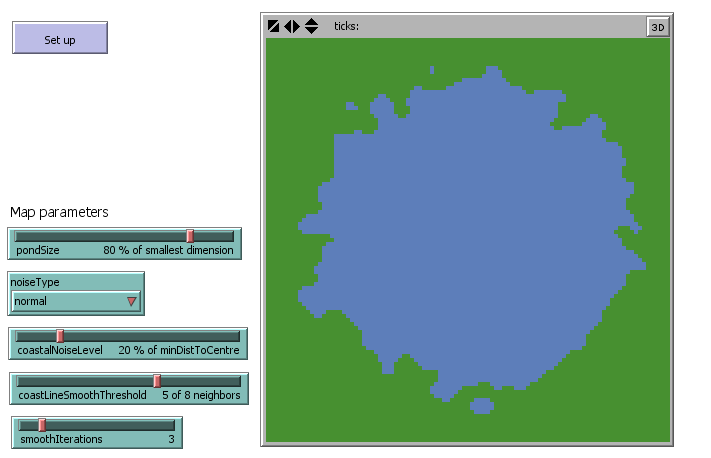
# 15 Conceptual design or modeling ### the Pond Trade model --- ## 15.1 Starting with models as references ### **Example: Reusing the Pond Trade Model** * Instead of building a model from scratch, we explore the **Pond Trade** conceptual model (2018). * It was designed as a learning tool for archaeology & history. ### **From Mechanism to Case Study** * Starting with a mechanism representing a phenomenon (e.g., trade). * Then selecting **evidence types** and a **case study** to demonstrate the model. --- ## 15.2 The Pond Trade context ### What the Pond Trade Model Represents * Models how **cultural integration** and **economic cycles** emerge from material exchange (“trade”). * Settlements interact within a **heterogeneous spatial environment** (“the pond”). * Focuses on how trade links settlement size, connectivity, and cultural traits. --- ## 15.2 The Pond Trade context ### Key Design Features * Multiple **agent types**. * A **cultural vector** representing cultural attributes. * **Procedural generation** of environmental and cultural data. * **Network dynamics** to model interaction patterns. * Reuse of **published submodels and algorithms**, following common archaeological ABM practice. --- ## 15.2 The Pond Trade context ### Development & Availability * Developed by **Andreas Angourakis**. * All versions available in: * Course repository (CoDArchLab-ABM/course-guide) * Original GitHub repository (Andros-Spica/PondTrade) * Designed as a learning tool. --- ## 15.2 The Pond Trade context ### Related Models * **TravellerSim** (Graham & Steiner, 2008) explores similar mechanisms. * Revisits ideas in older modelling traditions (e.g., Rihll & Wilson, 1991). * Although developed independently, all share a similar **informal economic formulation**: * Settlement size ↔ interconnectivity ↔ trade potential. * This is a common theme in archaeological ABMs. --- ## 15.3 Phenomenon ### Trade and economic size * Premisse: the settlement economy's size depends on the volume of materials exchanged between settlements for economic reasons (i.e. ‘trade’) * "Economic size" is a proxy for population, wealth, material production, etc. * Guiding thesis: economic size and trade are interdependent, leading to chaotic behaviour >Larger settlements can trade more, and settlements that trade more grow larger. (Positive feedback loop) * Plus: routes would be bounded to more stable constraints in space (e.g., distance, geography) --- ## 15.4 Mechanism: a first approach ### Core mechanism - Traders choose their destination trying to maximize the value of their cargo by considering settlement size and distance from their base settlement; - An active trade route will increase the economic size of settlements at both ends - An increase in size will increase trade by: - Making a settlement more attractive to traders from other settlements - Allowing the settlement to host more traders. - An active trade route will increase the cultural similarity between two settlements through the movement of traders and goods from one settlement to the other (cultural transmission) --- ## 15.4 Mechanism: a first approach ### Elements (potentially entities) - settlements - traders - terrain - routes - goods --- ## 15.4 Mechanism: a first approach ### Preliminary rules - Coastal settlements of variable size around a rounded water body (“pond”) - Traders travel between the settlements - Traders travel faster or slower depending on the terrain - Once in their base settlement, traders evaluate all possible trips and choose the one with the greater cost-benefit ratio - Traders carry economic value and cultural traits between the base and destination settlements - Settlement size depends on the economic value received from trading - The economic value produced in a settlement depends on its size - The number of traders per settlement depends on its size --- ## 15.4 Mechanism: a first approach ### Targeted dynamics - Settlements grow or shrink depending on the economic value received through trade - Trade routes emerge and disappear depending on their usage - Cultural traits spread between settlements through traders **TIP: Keep it simple, but creative! Know that your initial plan will surely change.** --- ## 15.5 Base terrain ### The Pond Environment <a title="Czeva, Public domain, via Wikimedia Commons" href="https://commons.wikimedia.org/wiki/File:Zahradni_jezirko.jpg"><img width="256" alt="Zahradni jezirko" src="https://upload.wikimedia.org/wikipedia/commons/thumb/9/9a/Zahradni_jezirko.jpg/512px-Zahradni_jezirko.jpg?20090222083747"></a> * A simple, abstract environment to focus on trade dynamics. * Circular area with land and water as types of land units. * Settlements placed on land units around the pond. * Terrain affects travel speed and route choices. --- ## 15.6 First-tier dynamics ### Settlement size and trader number *Mechanisms*: - ↑ global level of productivity → ↑ settlement production - ↑ number of settlements → ↓ distance between settlements - ↑ settlement size → ↑ settlement production → ↑ trade flow from/to settlement → ↑ settlement size - ↑ settlement size → ↑ number of traders based in settlement → ↑ trade flow from/to settlement → ↑ settlement size - ↑ trade attractiveness of route A to B → ↑ trade flow A to B - ↑ distance A to B → ↓ trade attractiveness A to B - ↑ size B → ↑trade attractiveness A to B - ↑ trade flow A to B → ↑ trade flow B to A --- ## 15.6 First-tier dynamics 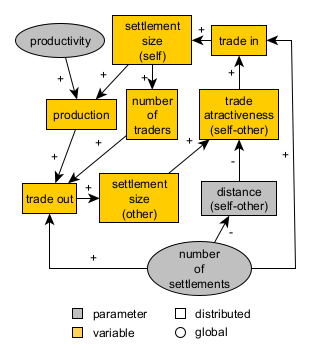 *Expected dynamics*: differentiation of settlements (size) according to their relative position --- ## 15.7 Second-tier dynamics ### Cultural traits transmission and evolution *Mechanisms*: - ↑ global undirected variation in culture → ↑ or ↓ cultural similarity A and B (cultural drift) - ↑ trade flow A to B → ↑ cultural similarity A and B (cultural integration) - ↑ global cultural permeability → ↑ cultural similarity A and B, if A and B are trading (acceleration of cultural integration) --- ## 15.7 Second-tier dynamics ### Cultural traits transmission and evolution <img src="assets/images/0_conceptAtStart_secondTier.png" width="300"> *Expected dynamics*: cultural integration as the outcome of exchange network dynamics --- ## 15.8 Conclusion **Caution in advancing to implementation** * The conceptual model is a preliminary design and will likely need adjustments during implementation. * Feedback loops are very influential and may lead to unexpected dynamics. --- # 16 Getting started with NetLogo ### Creating a "pond" terrain --- ## 16.1 Initial instructions - Start your own NetLogo file (inside your own repository, if working with Git locally) - Write the code progressively, following the guide - Test frequently to identify and fix issues early - Use comments extensively to document your code - Save versions of your code at significant milestones - At the end of each step, compare your code to the code in the reference files (inside "assets/netlogo/") - Ask for help if you get stuck! --- ## 16.2 Step 0: Drawing a blue circle ### Variable setting inside `ask` iterators ```NetLogo to create-map ask patches [ set pcolor blue ] end ``` --- ## 16.2 Step 0: Drawing a blue circle ### Having a (mathematical) think <a title="Jokes Free4Me, CC BY-SA 3.0 <https://creativecommons.org/licenses/by-sa/3.0>, via Wikimedia Commons" href="https://commons.wikimedia.org/wiki/File:Circle-withsegments.svg"><img width="256" alt="Circle-withsegments" src="https://upload.wikimedia.org/wikipedia/commons/thumb/0/03/Circle-withsegments.svg/512px-Circle-withsegments.svg.png"></a> We need: - A way to identify the center of the pond (0,0) - A way to identify the radius of the pond (e.g., 5 patches from the center) --- ## 16.2 Step 0: Drawing a blue circle ### Defining the center of the pond ```NetLogo to create-map ask patches [ let centralPatch patch 0 0 set pcolor blue ] end ``` --- ## 16.2 Step 0: Drawing a blue circle ### Defining the radius of the pond ```NetLogo to create-map ask patches [ let centralPatch patch 0 0 let minDistOfLandToCenter 5 set pcolor blue ] end ``` --- ## 16.2 Step 0: Drawing a blue circle ### Making radius a variable depending on `world-width` ```NetLogo to create-map ask patches [ let centralPatch patch 0 0 let minDistOfLandToCenter round (0.5 * (world-width / 2)) set pcolor blue ] end ``` --- ## 16.2 Step 0: Drawing a blue circle ### Differentiating land and water patches ```NetLogo to create-map ask patches [ ; set central patch let centralPatch patch 0 0 ; set minimum distance to center depending on world width let minDistOfLandToCenter round (0.5 * (world-width / 2)) ifelse (distance centralPatch < minDistOfLandToCenter) [ set pcolor blue ; water ] [ set pcolor green ; land ] ] end ``` --- ## 16.2 Step 0: Drawing a blue circle ### Checking the result in the interface <img src="https://codarchlab-abm.github.io/course-guide/assets/screenshots/BlockA_PondTrade_step00_blue-circle-interface.png" width="600"> <small>Create a button in the interface to call `create-map`</small> --- ## 16.3 Step 1a: De-composing "magic numbers" ### Making the model more flexible - Arbitrary numbers in code are "magic numbers" - They make the code less flexible and harder to read - Some are tolerable, but others may cause issues later on --- ## 16.3 Step 1a: De-composing "magic numbers" ### `centralPatch` `centralPatch` is always (0,0); what if we change the world settings? <img src="https://codarchlab-abm.github.io/course-guide/assets/screenshots/BlockA_PondTrade_step01_replacing-magic-numbers-adapt-center_0.png" width="200"> Solution: ```NetLogo let centralPatch patch (min-pxcor + floor (world-width / 2)) (min-pycor + floor (world-height / 2)) ``` --- ## 16.3 Step 1a: De-composing "magic numbers" ### `minDistOfLandToCenter` What if we want to change the grid shape (e.g., rectangular)? <img src="https://codarchlab-abm.github.io/course-guide/assets/screenshots/BlockA_PondTrade_step01_replacing-magic-numbers-adapt-center_1.png" width="400"> Solution: make `minDistOfLandToCenter` depend on both `world-width` and `world-height`. ```NetLogo let minXDistOfLandToCenter round (0.5 * world-width / 2) ; minimum distance in X let minYDistOfLandToCenter round (0.5 * world-height / 2) ; minimum distance in Y let minDistOfLandToCenter min (list minXDistOfLandToCenter minYDistOfLandToCenter) ``` --- ## 16.3 Step 1a: De-composing "magic numbers" ### `minDistOfLandToCenter` | 100x20 | 20x100 | | --- | --- | | <img src="https://codarchlab-abm.github.io/course-guide/assets/screenshots/BlockA_PondTrade_step01_replacing-magic-numbers-adapt-center_2.png" width="250"> | <img src="https://codarchlab-abm.github.io/course-guide/assets/screenshots/BlockA_PondTrade_step01_replacing-magic-numbers-adapt-center_3.png" width="50"> | Test the solution! --- ## 16.3 Step 1b: Parameterizing ### Making the pond size adjustable ```NetLogo let minXDistOfLandToCenter round (0.5 * world-width / 2) ; minimum distance in X let minYDistOfLandToCenter round (0.5 * world-height / 2) ; minimum distance in Y let minDistOfLandToCenter min (list minXDistOfLandToCenter minYDistOfLandToCenter) ``` `0.5` is "hard-coded", which is not useful if we want to change the pond size later on. --- ## 16.3 Step 1b: Parameterizing ### Making the pond size adjustable Solution: introduce a global variable `pondSize` as a slider in the interface, expressed as a fraction of the world dimensions. ```NetLogo let minXDistOfLandToCenter round (pondSize * world-width / 2) ; minimum distance in X let minYDistOfLandToCenter round (pondSize * world-height / 2) ; minimum distance in Y let minDistOfLandToCenter min (list minXDistOfLandToCenter minYDistOfLandToCenter) ``` <small>Create a slider names `pondSize` in the interface, with a range from 0 to 100, and a step of 1. In units, write "% of smallest dimension".</small> --- ## 16.3 Step 1c: Optimasing ### Is this code efficient? ```NetLogo to create-map ask patches [ ; find central patch, depending on the size of dimensions let centralPatch patch (min-pxcor + floor (world-width / 2)) ; position in X (min-pycor + floor (world-height / 2)) ; position in Y ; find minimun distance of land pathes to the central patch, depending on the size of dimensions let minXDistOfLandToCenter round ((pondSize / 100) * (world-width / 2)) ; minimum distance in X let minYDistOfLandToCenter round ((pondSize / 100) * (world-height / 2)) ; minimum distance in Y let minDistOfLandToCenter min (list minXDistOfLandToCenter minYDistOfLandToCenter) ifelse (distance centralPatch < minDistOfLandToCenter) [ set pcolor blue ; water ] [ set pcolor green ; land ] ] end ``` --- ## 16.3 Step 1c: Optimasing ### Better alternative ```NetLogo to create-map ; find central patch, depending on the size of dimensions let centralPatch patch (min-pxcor + floor (world-width / 2)) ; position in X (min-pycor + floor (world-height / 2)) ; position in Y ; find minimun distance of land pathes to the central patch, depending on the size of dimensions let minXDistOfLandToCenter round ((pondSize / 100) * (world-width / 2)) ; minimum distance in X let minYDistOfLandToCenter round ((pondSize / 100) * (world-height / 2)) ; minimum distance in Y let minDistOfLandToCenter min (list minXDistOfLandToCenter minYDistOfLandToCenter) ask patches [ ifelse (distance centralPatch < minDistOfLandToCenter) [ set pcolor blue ; water ] [ set pcolor green ; land ] ] end ``` --- ## 16.3 Step 1c: Optimasing ### Checking the result in the interface <img src="https://codarchlab-abm.github.io/course-guide/assets/screenshots/BlockA_PondTrade_step01_replacing-magic-numbers-interface.png" alt="Pond Trade step 1" width="600"/> <small>Test different values of the `pondSize` slider in the interface.</small> --- ## 16.4 Step 2a: Pacing comments and line breaks Once the code is working and clear, readability can also be improved by reducing or simplifying comments and line breaks. ```NetLogo to create-map let centralPatch patch (min-pxcor + floor (world-width / 2)) (min-pycor + floor (world-height / 2)) ; find minimun distance to center let minXDistOfLandToCenter round ((pondSize / 100) * (world-width / 2)) ; minimum distance in X let minYDistOfLandToCenter round ((pondSize / 100) * (world-height / 2)) ; minimum distance in Y let minDistOfLandToCenter min (list minXDistOfLandToCenter minYDistOfLandToCenter) ask patches [ ifelse (distance centralPatch < minDistOfLandToCenter) [ set pcolor blue ; water ] [ set pcolor green ; land ] ] end ``` --- ## 16.4 Step 2b: Exploring alternative designs ### Alternative code solutions are always possible Using `if` instead of `ifelse`, two local variables instead of three, etc. ```NetLogo ;let minXDistOfLandToCenter round ((pondSize / 100) * (world-width / 2)) ; minimum distance in X ;let minYDistOfLandToCenter round ((pondSize / 100) * (world-height / 2)) ; minimum distance in Y ;let minDistOfLandToCenter min (list minXDistOfLandToCenter minYDistOfLandToCenter) let halfSmallerDimension (world-width / 2) if (world-width > world-height) [ set halfSmallerDimension (world-height / 2) ] let minDistOfLandToCenter round ((pondSize / 100) * halfSmallerDimension) ``` <small>Test alternative code fragments by "commenting-out/in" them in the code editor.</small> --- ## 16.5 Step 2c: Colors and shades <img src="https://docs.netlogo.org/images/colorpicker/colorpickersimple.png" alt="colorpicker" width="500"/> Consult "Tools > Color Picker" for color names and codes. --- ## 16.5 Step 2c: Colors and shades ### Checking the result in the interface <img src="https://codarchlab-abm.github.io/course-guide/assets/screenshots/BlockA_PondTrade_step02_refactoring-interface.png" alt="Pond Trade step 1" width="600"/> --- ## 16.6 Step 3: Adding noise (*stochasticity*) ### The hidden stochasticity in NetLogo In the interface, reduce the velocity somewhat and execute `create-map`. <img src="https://codarchlab-abm.github.io/course-guide/assets/screenshots/BlockA_PondTrade_step03_hidden-noise.png" alt="hidden noise" width="200"/> You will notice that the order in which patches are asked to execute their code is not fixed to a preordered sequence (e.g., left to right, top to bottom). --- ## 16.6 Step 3: Adding noise (*stochasticity*) ### The hidden stochasticity in NetLogo Execute `create-map` several times. You will notice that the result is slightly different each time. In this case, the hidden stochasticity does not affect the final result, but in other cases it might. --- ## 16.6 Step 3: Adding noise (*stochasticity*) ### When this hidden stochasticity matters When agents depend on each other to make decisions (e.g., movement, interaction) When it is desirable: - process might be sensitive to scheduling order, but its effect is uninteresting, trivial, or unknown - there is uncertainty about the order in which agents should act > **Example:** A group of agents moving randomly in space. The order in which agents are asked to move is not important, as long as it is different each time. --- ## 16.6 Step 3: Adding noise (*stochasticity*) ### When this hidden stochasticity matters When it is undesirable: - the order in which agents are asked to act is important for the model outcome - process should be following a fixed, known order > **Example:** A group of agents racing towards a target in space. The order in which agents are asked to move might affect who is the winner. --- ## 16.6 Step 3: Adding noise (*stochasticity*) ### Adding noise to the pond "coastline" ```NetLogo ; add noise to coast line let coastThreshold minDistOfLandToCenter + random-float (halfSmallerDimension * coastalNoiseLevel / 100) ifelse (distance centralPatch < coastThreshold) [ set pcolor 106 ; blue for water ] [ set pcolor 54 ; green for land ] ``` <small>Create a slider names `coastalNoiseLevel` in the interface, with a range from 0 to 100, and a step of 1. In units, write "% of minDistToCentre".</small> --- ## 16.6 Step 3: Adding noise (*stochasticity*) ### Adding noise to the pond "coastline" <img src="https://codarchlab-abm.github.io/course-guide/assets/screenshots/BlockA_PondTrade_step03_adding-noise-interface.png" alt="hidden noise" width="600"/> Test different values of the `coastalNoiseLevel` slider in the interface. --- ## 16.7 Step 4b: design alternatives ### More ways to add noise Adding noise can be done in many different ways, using different probability distributions. NetLogo provides a number of functions to generate random numbers: - `random-float` (used above) - `random-normal` - `random-exponential` ... See the `random` family of functions in the NetLogo dictionary. --- ## 16.7 Step 4b: design alternatives ### Adding alternatives ```NetLogo ; no noise let coastThreshold minDistOfLandToCenter ; uniform-distributed noise ; let coastThreshold minDistOfLandToCenter + random-float (halfSmallerDimension * coastalNoiseLevel / 100) ; normal-distributed noise let coastThreshold random-normal minDistOfLandToCenter (halfSmallerDimension * coastalNoiseLevel / 100) ``` Test different noise functions by "commenting-out/in" them in the code editor. --- ## 16.8 Step 5: Adding more noise ### Testing | no noise | uniform | normal | | --- | --- | --- | | <img src="https://codarchlab-abm.github.io/course-guide/assets/screenshots/BlockA_PondTrade_step04_design-alternatives-and-iterations-and-printing_noNoise.png" width="200"> | <img src="https://codarchlab-abm.github.io/course-guide/assets/screenshots/BlockA_PondTrade_step04_design-alternatives-and-iterations-and-printing_uniform.png" width="200"> | <img src="https://codarchlab-abm.github.io/course-guide/assets/screenshots/BlockA_PondTrade_step04_design-alternatives-and-iterations-and-printing_normal.png" width="200"> | --- ## 16.8 Step 4c: *keeping* design alternatives ### "Choosers" in the interface <img src="https://codarchlab-abm.github.io/course-guide/assets/screenshots/BlockA_PondTrade_step04_design-alternatives-and-iterations-and-printing_chooser.png" width="500"> <small>Create a chooser named `coastalNoiseType` in the interface, with options "no noise", "uniform", and "normal".</small> --- ## 16.8 Step 4c: *keeping* design alternatives ### "Choosers" in the code ```NetLogo if (noiseType = "uniform") [ ; adds a random amount from a uniform distribution with mean minDistOfLandToCenter set noiseRange (random-float noiseRange) - (noiseRange / 2) set coastThreshold minDistOfLandToCenter + noiseRange ] if (noiseType = "normal") [ ; adds a random amount from a normal distribution with mean minDistOfLandToCenter set coastThreshold random-normal minDistOfLandToCenter noiseRange ] ``` --- ## 16.8 Step 4d: patch neighborhood ### Using grid to smooth coastlines ```NetLogo to smooth-coast-line ask patches [ ifelse (pcolor = 106) [ ; water patch if (count neighbors with [pcolor = 54] >= coastLineSmoothThreshold) [ ; water patch has a certain number of land neighbors set pcolor 54 ; converted to land ] ] [ ; land patch if (count neighbors with [pcolor = 106] >= coastLineSmoothThreshold) [ ; land patch has a certain number of water neighbors set pcolor 106 ; converted to water ] ] ] end ``` <small>Create a slider names `coastLineSmoothThreshold` in the interface, with a range from 0 to 8, and a step of 1. In units, write "of 8 neighbors".</small> --- ## 16.8 Step 4e: patch neighborhood ### Testing smoothing | no noise | uniform | normal | | --- | --- | --- | | <img src="https://codarchlab-abm.github.io/course-guide/assets/screenshots/BlockA_PondTrade_step04_design-alternatives-and-iterations-and-printing_noNoise.png" width="200"> | <img src="https://codarchlab-abm.github.io/course-guide/assets/screenshots/BlockA_PondTrade_step04_design-alternatives-and-iterations-and-printing_uniformAndSmooth.png" width="200"> | <img src="https://codarchlab-abm.github.io/course-guide/assets/screenshots/BlockA_PondTrade_step04_design-alternatives-and-iterations-and-printing_normalAndSmooth.png" width="200"> | <small>Create a button linked to the `smooth-coast-line` procedure and press it a few times after `create-map`.</small> --- ## Step 4e: iterative structures ### Repeat smoothing ```NetLogo to smooth-coast-line ; smooth coast line repeat smoothIterations [ ask patches [ ifelse (pcolor = 106) [ ; water patch if (count neighbors with [pcolor = 54] >= coastLineSmoothThreshold) [ ; water patch has a certain number of land neighbors set pcolor 54 ; converted to land ] ] [ ; land patch if (count neighbors with [pcolor = 106] >= coastLineSmoothThreshold) [ ; land patch has a certain number of water neighbors set pcolor 106 ; converted to water ] ] ] ] end ``` <small>Create a slider names `smoothIterations` in the interface, with a range from 1 to 10, and a step of 1. In units, write "iterations".</small> --- ## Step 4f: using the `clear-all` command ### Tabula rasa ```NetLogo to create-map ; erase previous data clear-all ; ... existing code ... end ``` --- ## Step 4g: printing event messages ### Notifying the user ```NetLogo to create-map print "Creating map..." ; ... existing code ... print "Assigning initial patch types..." ; ... existing code ... print "done." end to smooth-coast-line print "Smoothing coast line..." ; ... existing code ... print "done." end ``` --- ## Step 4g: printing event messages ### Checking the result in the interface <img src="https://codarchlab-abm.github.io/course-guide/assets/screenshots/BlockA_PondTrade_step04_design-alternatives-and-iterations-and-printing-interface.png" alt="hidden noise" width="600"/> --- ## Step 5: refactoring (again) ### Lots of improvements to do - Control the RNG seed and expose it in the interface - Move the initialisation of `coastThreshold` and `noiseRange` before `ask patches` - Declare a new patch Boolean variable called `isLand` and use it to replace color in the procedures for creating terrains - Define a new procedure `paint-patches` dedicated only to set patch colors based on `isLand` - Call `smooth-coast-line` and `paint-patches` at the end of `create-map` - In the evaluation of `coastLineSmoothThreshold` used in `smooth-coast-line`, consider it in relation to the actual number of neighbors instead of as an absolute number (to avoid having isolated water bodies adjacent to the world edges, where there are less than 8 neighbors) - Rearrange the interface elements to set apart the parameters we will be using for terrain generation **Do these, preferably one at a time and by yourself - check the solution only if you get stuck!** --- ## Step 5: refactoring (again) ### The result (code) ```NetLogo patches-own [ isLand ] to setup clear-all ; set the random seed so we can reproduce the same experiment random-seed seed create-map end to create-map let centralPatch patch (min-pxcor + (floor world-width / 2)) (min-pycor + (floor world-height / 2)) let halfSmallerDimension (world-width / 2) if (world-width > world-height) [ set halfSmallerDimension (world-height / 2) ] let minDistOfLandToCenter round ((pondSize / 100) * halfSmallerDimension) let coastThreshold minDistOfLandToCenter ; defaults to the basic value ;; add noise to coast line ; set general noise range depending on UI's coastalNoiseLevel and the size of world let noiseRange (halfSmallerDimension * coastalNoiseLevel / 100) ask patches [ ; noiseType is specified with the chooser in the UI if (noiseType = "uniform") [ ; adds a random amount from a uniform distribution with mean minDistOfLandToCenter set noiseRange (random-float noiseRange) - (noiseRange / 2) set coastThreshold minDistOfLandToCenter + noiseRange ] if (noiseType = "normal") [ ; adds a random amount from a normal distribution with mean minDistOfLandToCenter set coastThreshold random-normal minDistOfLandToCenter (halfSmallerDimension * coastalNoiseLevel / 100) ] ifelse (distance centralPatch < coastThreshold) [ set isLand false ] [ set isLand true ] ] smooth-coast-line paint-patches end to smooth-coast-line ; smooth coast line repeat smoothIterations [ ask patches [ ifelse (isLand = false) [ ; water patch ; consider ratios instead of absolute numbers to avoid having isolated water bodies adjacent to the world limits (less than 8 neighbors) if (count neighbors with [isLand = true] / count neighbors >= coastLineSmoothThreshold / 8) [ ; water patch has a certain number of land neighbors set isLand true ; converted to land ] ] [ ; land patch if (count neighbors with [isLand = false] / count neighbors >= coastLineSmoothThreshold / 8) [ ; land patch has a certain number of water neighbors set isLand false ; converted to water ] ] ] ] end to paint-patches ask patches [ ifelse (isLand = false) [ set pcolor 106 ] ; blue for water [ set pcolor 54 ] ; green for land ] end ``` --- ## Step 5: refactoring (again) ### The result (interface)