# 17 Defining and initialising agents --- ## Slide - Guide - Your file - Milestone file 1. Briefing together (slides) 2. Read section in the guide (if needed), focus on the code 3. Extend the code in your own file (test procedures separately if needed) 4. Check if your file matches the solution (no need to be identical) After 15 minutes, we will discuss the code together **Repeat** <small>You can use tools like [Text Compare!](https://text-compare.com/) to compare your file with the solution file</small> --- ## 17.1 Refresing the specificacions of the conceptual model Aim: implement the **first-tier** conceptual model 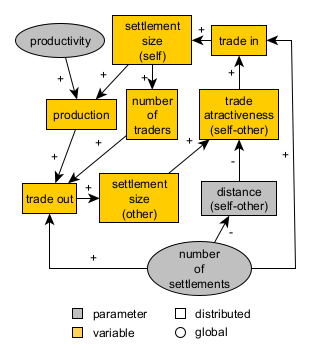 First step: define the agents and their attributes --- ## 17.2 Agent declaration - `settlements`: fixed to a coastal patch and with an "economic size" (`sizeLevel`). - `traders`: mobile agents but with a fixed base at a settlement (`base`). ```NetLogo breed [ settlements settlement ] breed [ traders trader ] settlements-own [ sizeLevel ] traders-own [ base ] ``` <small>`size` is not a valid name. It is a reserved word in NetLogo and it is used to define the size of the agent shape in the interface.</small> --- ## 17.3 Creating `settlements` 🤔 Before looking at the solution, try to write the code yourself: - Number of `settlements` set by user via a slider (`numberOfSettlements`) - Create `settlements` on coastal patches only - No more than one `settlement` per patch - Assign them a random `sizeLevel` between 1 and 10 (temporary) - shape: "circle 2" (arbitrary) - size: 1 + `sizeLevel` / 3 (to visualise size differences) Work the code as a onion, layer by layer (start with the easier parts): - How should a `settlement` be initialised? (internal variable settings) - How to check if a patch is coastal? - How to ensure no more than one `settlement` per patch? - How to create a given number of `settlements`? --- ## 17.4 Creating `settlements` - Solution ```NetLogo to create-coastal-settlements ; consider only coastal patches let coastalPatches patches with [(isLand = true) and (any? neighbors with [isLand = false])] repeat numberOfSettlements [ ; ask a random coastal patch without a settlement already ask one-of coastalPatches with [not any? settlements-here] [ sprout-settlements 1 ; creates one "turtle" of breed settlements [ set sizeLevel 1 + random 10; sets a random arbitrary size level for the settlement (between 1 and 10) ; give meaningful display proportional to size set shape "circle 2" set size 1 + sizeLevel / 3 ] ; exclude this patch from the pool of coastal patches set coastalPatches other coastalPatches ] ] end ``` <small>Remember to create `numberOfSettlements` as a slider in the interface.</small> --- ## 17.5 Creating `traders` 🤔 Before looking at the solution, try to write the code yourself: - Number of `traders` set by the `sizeLevel` of each `settlement` (i.e. bigger settlements have more traders) - Each `trader` has a fixed `base` settlement - color: same as the `base` settlement - shape: "sailboat side" (arbitrary) - size: 3 (arbitrary) - Initially place each `trader` somewhere in the pond (not on land) (temporary) Again, separate and conquer the different parts of the code: - How should a `trader` be initialised? (internal variable settings) - How to assign a random `base` settlement to each `trader`? - How to create a given number of `traders`? Tip: use `hatch` to create `traders` from each `settlement`. --- ## 17.6 Creating `traders` - Solution ```NetLogo to create-traders-per-settlement ask settlements [ let thisSettlement self ; to avoid the confusion of nested agent queries hatch-traders round sizeLevel ; use the sizeLevel variable as the number of traders based in the settlement [ set base thisSettlement ; give meaningful display related to base set shape "sailboat side" ; import this shape from the library (Tools > Shape editor > import from library) set color [color] of base set size 3 ; place it somewhere in the pond, randomly for now (if not, the command "hatch-breed" will place them in the same patch of the settlement) move-to one-of patches with [isLand = false] ] ] end ``` --- ## 17.7 Adapting `setup` (initialisation) - Bring all together in `setup` (in which order?) - Ensure any previous simulation is cleared first (`clear-all`) - Fix the random seed (repeatable results) - Add an `update-display` at the end to hide or reveal settlements as per user settings (switch in the interface) - If not already done, create the necessary interface elements (sliders, switches, etc.) --- ## 17.8 Adapting `setup` - Solution ```NetLogo to setup clear-all ; set the random seed so we can reproduce the same experiment random-seed seed create-map create-coastal-settlements create-traders-per-settlement update-display end to update-display ask settlements [ set hidden? not showSettlements ] end ``` --- ### Checking the milestone File (step 6) <img src="https://codarchlab-abm.github.io/course-guide/assets/screenshots/BlockB_PondTrade_step06_agent-types-interface.png" width="600"> --- ## 17.9 Check agent variable inheritance - `create` amd `sprout` commands: no inheritance - `hatch` command: inheritance from parent agent (the one that hatches the new agent) In this case, the parent agent is the settlement, so the trader inherits the values of all shared variables (e.g. `xcor`, `ycor`, `colour`, `breed`, etc.) from the settlement. --- ## 17.9 Check agent variable inheritance Test this by inspecting a trader and its base settlement after running `setup`. <img src="https://github.com/CoDArchLab-ABM/course-guide/blob/main/assets/screenshots/BlockB_PondTrade_step06_agent-types-interface_agentDetail.png?raw=true" width="300"> <small>Note: you can also use the `inspect` command to inspect agents.</small> --- However, these variables were set explicitly (overwriting the inherited values) Comment-out the line `set color [color] of base` in the `create-traders-per-settlement` procedure: ```NetLogo to create-traders-per-settlement ... ; give meaningful display related to base set shape "sailboat side" ; import this shape from the library (Tools > Shape editor > import from library) ;set color [color] of base set size 3 ... end ``` Run `setup` again and inspect a trader and its base settlement again to see the effect of inheritance in the variable `color`. <small>Note 2: the line is irrelevant, however it might be useful in other contexts. Keep it!</small>