17 Defining and initialising agents
In the following chapters, we will finally build a version of Pond Trade through steps that will introduce you to more advanced algorithms that bring us closer to our conceptual model, such as path cost calculation, feedback loops, and evolution through vector variables.
So that we can cover all the steps at a good pace, we will not be delving into the same details as in chapter 16. I recommend you follow the steps in this block using the copy-and-paste functionality to update your script. If your version at the end of each step does not work as expected, you may want to compare it to the corresponding script (.nlogo) included in the repository (use tools like Text Compare!). If there are any doubts about NetLogo primitives, for example, remember to consult the NetLogo Dictionary from the Help menu.
Here is a recommended workflow (outside the class):
- Read section in the guide
- Extend the code in your own file (test procedures separately if needed), preferably doing the coding challenges
- Check if your file matches the solution (no need to be identical)
- Repeat
17.1 Refresing the specificacions of the conceptual model
Our first aim is to reach a consolidated version corresponding to the first-tier conceptual model. In the original Pond Trade repository, this will cover the development steps 6 to 9.
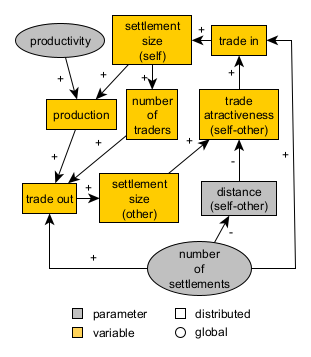
Pond Trade conceptual model at start (first tier)
One of the necessary first steps in implementing and ABM model is to define the types of agents we plan to have, based on our initial conceptual model. We must emphasise the plan part here. There is always the possibility that we will revise the conceptual model up to the point that we will require more or fewer specifications about the agents.
17.2 Agent declaration
According to our conceptual model so far, we need two types of agents:
settlements: fixed to a coastal patch and with an “economic size” (sizeLevel). Create traders according to their size.traders: mobile agents but with a fixed base at a settlement (base).
breed [ settlements settlement ]
breed [ traders trader ]

settlements-own [ sizeLevel ]

traders-own [ base ]Notice that we intentionally avoid naming the size of settlements as size, since it is a NetLogo primitive used to scale the pixel size turtles in the view screen.
17.3 Creating settlements 🤔
We then write a procedure to handle the creation of all settlements, which under the PondTrade specifications, should always be placed in an empty land patch adjacent to at least one water patch (i.e., coastal settlements).
Before looking at the solution, try to write the code yourself:
- Number of
settlementsset by user via a slider (numberOfSettlements)
- Create
settlementson coastal patches only
- No more than one
settlementper patch
- Assign them a random
sizeLevelbetween 1 and 10 (temporary)
- shape: “circle 2” (arbitrary)
- size: 1 +
sizeLevel/ 3 (to visualise size differences)
Work the code as a onion, layer by layer (start with the easier parts):
- How should a
settlementbe initialised? (internal variable settings)
- How to check if a patch is coastal?
- How to ensure no more than one
settlementper patch?
- How to create a given number of
settlements?
Solution:
to create-coastal-settlements

  ; consider only coastal patches
  let coastalPatches patches with [(isLand = true) and (any? neighbors with [isLand = false])]

  repeat numberOfSettlements
  [
    ; ask a random coastal patch without a settlement already
    ask one-of coastalPatches with [not any? settlements-here]
    [
      sprout-settlements 1 ; creates one "turtle" of breed settlements
      [
        set sizeLevel 1 + random 10; sets a random arbitrary size level for the settlement (between 1 and 10)

        ; give meaningful display proportional to size
        set shape "circle 2"
        set size 1 + sizeLevel / 3
      ]
      ; exclude this patch from the pool of coastal patches
      set coastalPatches other coastalPatches
    ]
  ]

end
We are introducing the parameter numberOfSettlements, which we add to the interface tab as a slider (e.g., spanning from 0 to 100 by increments of 1). We randomise sizeLevel to get a sense of how we will visualise these agents.
17.4 Creating traders 🤔
We implement the procedure for creating traders, which is a call to all settlements to generate several traders proportional to its sizelevel. We give them a nice sail boat shape and place them randomly inside the pond.
Before looking at the solution, try to write the code yourself:
- Number of
tradersset by thesizeLevelof eachsettlement(i.e. bigger settlements have more traders)
- Each
traderhas a fixedbasesettlement
- color: same as the
basesettlement
- shape: “sailboat side” (arbitrary)
- size: 3 (arbitrary)
- Initially place each
tradersomewhere in the pond (not on land) (temporary)
Again, separate and conquer the different parts of the code:
- How should a
traderbe initialised? (internal variable settings)
- How to assign a random
basesettlement to eachtrader?
- How to create a given number of
traders?
Tip: use hatch to create traders from each settlement.
Solution:
to create-traders-per-settlement

  ask settlements
  [
    let thisSettlement self ; to avoid the confusion of nested agent queries
    hatch-traders round sizeLevel ; use the sizeLevel variable as the number of traders based in the settlement
    [
      set base thisSettlement

      ; give meaningful display related to base
      set shape "sailboat side" ; import this shape from the library (Tools > Shape editor > import from library)
      set color [color] of base
      set size 3

      ; place it somewhere in the pond, randomly for now (if not, the command "hatch-breed" will place them in the same patch of the settlement)
      move-to one-of patches with [isLand = false]
    ]
  ]

end
17.5 Adapting setup (initialisation) 🤔
Add these procedures to setup, after create-map:
- Bring all together in
setup(in which order?)
- Ensure any previous simulation is cleared first (
clear-all)
- Fix the random seed (repeatable results)
- Add an
update-displayat the end to hide or reveal settlements as per user settings (switch in the interface)
- If not already done, create the necessary interface elements (sliders, switches, etc.)
Solution:
to setup

  clear-all

  ; set the random seed so we can reproduce the same experiment
  random-seed seed

  create-map

  create-coastal-settlements

  create-traders-per-settlement

end
Press the Set up button and observe the outcome.
Given the appearance of the view screen so far, we might foresee it becoming too populated by agent icons later. As a precaution, let us enable a simple visualisation option, to switch on and off the settlement icons:
to setup

  clear-all

  ; set the random seed so we can reproduce the same experiment
  random-seed seed

  create-map

  create-coastal-settlements

  create-traders-per-settlement

  update-display

end

to update-display

  ask settlements [ set hidden? not showSettlements ]

end
17.6 Checking the milestone File (step 6)
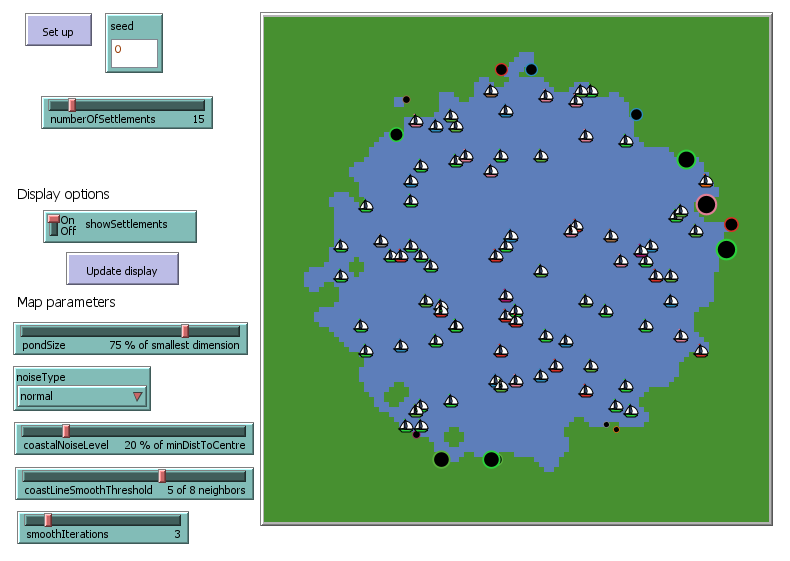
Pond Trade step 6
17.7 Check agent variable inheritance
Unless specified otherwise, all new turtles created with create-<BREED> or sprout-<BREED> are assigned a random colour. In this case, settlements were created by specific patches with sprout-settlements, and these created traders with hatch-traders. Unlike create and sprout, the hatch command assumes that all variables in common between the creator (turtle) and the created (turtle) are to be inherited.
To check this after initialising your agents, right-click on top of a trader and select “trader <WHO NUMBER> > inspect trader <WHO NUMBER>”.
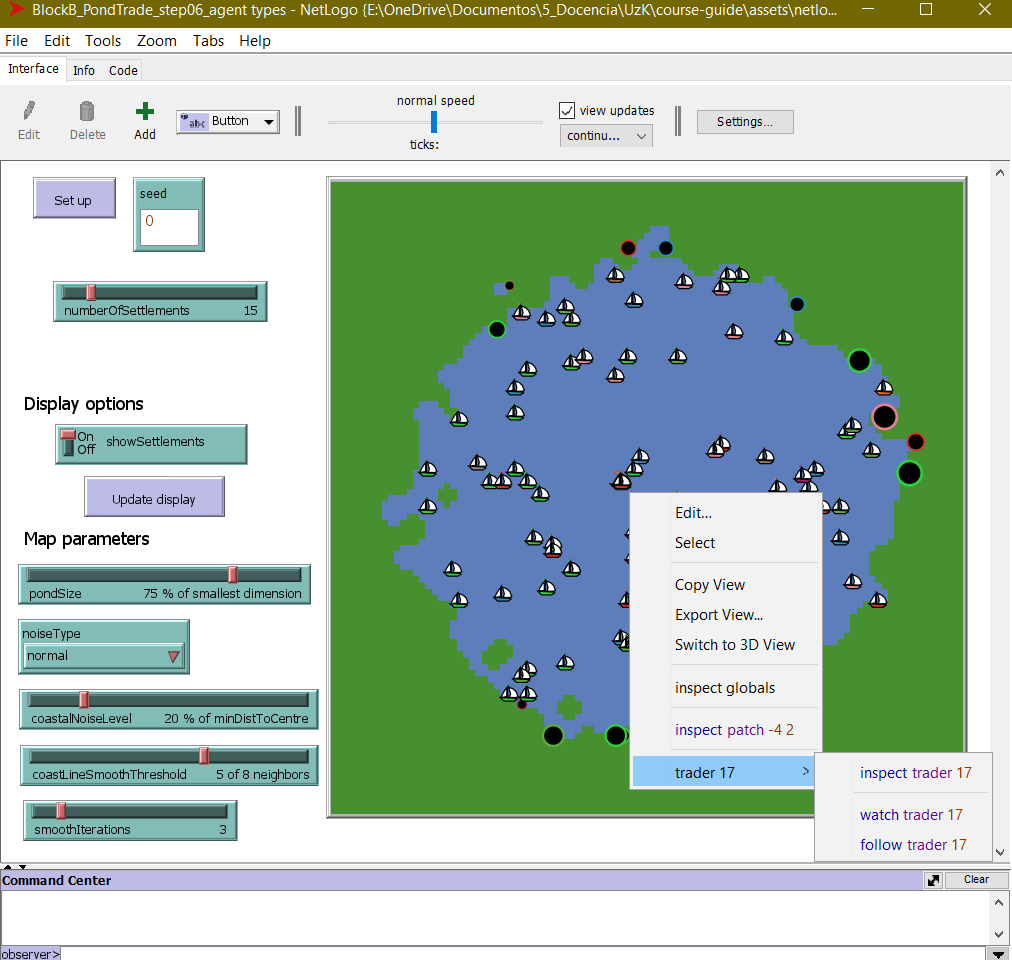
You now get a focus pop-up context menu where the values of each agent variable are shown. Do the same to check the information about this trader base. This time, however, write the inspect settlement <WHO NUMBER> directly into the console.
However, with our current code, there are no margin for inheritance: all variables with shared names between the two breeds (xcor, ycor, color, etc.) were set explicitly during initialisation (overwriting the inherited values). Go back to create-traders-per-settlement, comment-out the line set color [color] of base:
to create-traders-per-settlement
      ...

      ; give meaningful display related to base
      set shape "sailboat side" ; import this shape from the library (Tools > Shape editor > import from library)
      ;set color [color] of base
      set size 3

      ...

end
Run setup again. You can now verify that, even without this line, any trader will have the exact same colour than its base settlement. This small line might be useful though, so let us keep it for now.
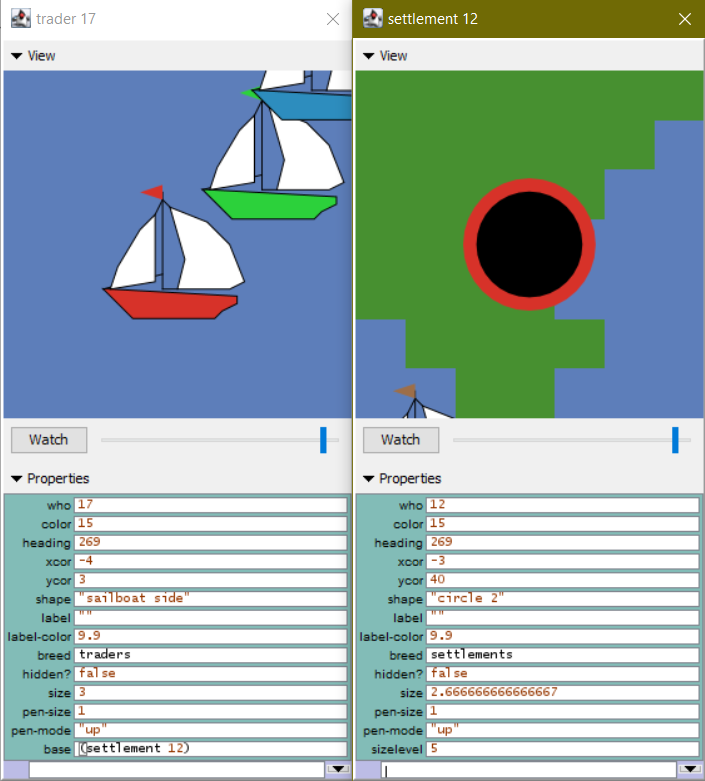
Pond Trade step 6 - agent detail