33  Visualisation of simulation results

33.1 πŸ“Š Analysis Pipeline for Simulation Results

πŸ’Ύ Simulation outputs: BehaviorSpace CSV files
        ↓
πŸ“₯ Import data: R, tidyverse
        ↓
🧹 Clean & prepare: Data wrangling, filtering, reshaping
        ↓
πŸ“ˆ Explore: Descriptive plots, distributions, correlations
        ↓
πŸ“Š Analyse: Statistical models, sensitivity analysis
        ↓
πŸ–ΌοΈ Visualise: Publication-ready plots, dashboard
        ↓
🧩 Interpret: Compare with hypotheses, archaeological data
        ↓
πŸ“˜ Report & share: RMarkdown, GitHub, Zenodo DOI
        β†Ί
πŸ” Refine model or experiment design

33.2 Set up R environment

To start, we should load and define all necessary elements in R that will be used through out our script:

library(tidyverse)
── Attaching core tidyverse packages ──────────────────────── tidyverse 2.0.0 ──
βœ” dplyr     1.2.0     βœ” readr     2.1.6
βœ” forcats   1.0.1     βœ” stringr   1.6.0
βœ” ggplot2   4.0.2     βœ” tibble    3.3.1
βœ” lubridate 1.9.5     βœ” tidyr     1.3.2
βœ” purrr     1.2.1     
── Conflicts ────────────────────────────────────────── tidyverse_conflicts() ──
βœ– dplyr::filter() masks stats::filter()
βœ– dplyr::lag()    masks stats::lag()
β„Ή Use the conflicted package (<http://conflicted.r-lib.org/>) to force all conflicts to become errors
experiments_path <- "assets/netlogo/experiments/Artificial Anasazi_experiments "
color_mapping <- c("historical households" = "blue", 
                   "simulation households" = "darkred")

33.3 Loading datasets

Single run

expname_single <- "experiment single run"

results_single <- readr::read_csv(paste0(experiments_path, expname_single, "-table.csv"), skip = 6)
Rows: 552 Columns: 11
── Column specification ────────────────────────────────────────────────────────
Delimiter: ","
chr (1): map-view
dbl (9): [run number], fertility, death-age, harvest-variance, fertility-end...
lgl (1): historic-view?

β„Ή Use `spec()` to retrieve the full column specification for this data.
β„Ή Specify the column types or set `show_col_types = FALSE` to quiet this message.

Repetitions in single configuration

expname_multiple <- "experiment multiple runs"

results_multiple <- readr::read_csv(paste0(experiments_path, expname_multiple, "-table.csv"), skip = 6)
Rows: 5520 Columns: 11
── Column specification ────────────────────────────────────────────────────────
Delimiter: ","
chr (1): map-view
dbl (9): [run number], fertility, death-age, harvest-variance, fertility-end...
lgl (1): historic-view?

β„Ή Use `spec()` to retrieve the full column specification for this data.
β„Ή Specify the column types or set `show_col_types = FALSE` to quiet this message.

Parameter exploration - harvest adjustment

expname_harvest_adj <- "experiment harvest adjustment"

results_harvest_adj <- readr::read_csv(paste0(experiments_path, expname_harvest_adj, "-table.csv"), skip = 6)
Rows: 104880 Columns: 11
── Column specification ────────────────────────────────────────────────────────
Delimiter: ","
chr (1): map-view
dbl (9): [run number], fertility, death-age, harvest-variance, fertility-end...
lgl (1): historic-view?

β„Ή Use `spec()` to retrieve the full column specification for this data.
β„Ή Specify the column types or set `show_col_types = FALSE` to quiet this message.

Parameter exploration - harvest adjustment vs. harvest-variance

expname_harvest_adj_var <- "experiment harvest adjustment variance"

results_harvest_adj_var <- readr::read_csv(paste0(experiments_path, expname_harvest_adj_var, "-table.csv"), skip = 6)
Rows: 441600 Columns: 11
── Column specification ────────────────────────────────────────────────────────
Delimiter: ","
chr (1): map-view
dbl (9): [run number], fertility, death-age, harvest-variance, fertility-end...
lgl (1): historic-view?

β„Ή Use `spec()` to retrieve the full column specification for this data.
β„Ή Specify the column types or set `show_col_types = FALSE` to quiet this message.

33.4 First overview

In R, there are many ways of having our first look at the data. An useful function from the tidyverse family is glimpse.

glimpse(results_single)
Rows: 552
Columns: 11
$ `[run number]`                <dbl> 1, 1, 1, 1, 1, 1, 1, 1, 1, 1, 1, 1, 1, 1…
$ fertility                     <dbl> 0.155, 0.155, 0.155, 0.155, 0.155, 0.155…
$ `death-age`                   <dbl> 38, 38, 38, 38, 38, 38, 38, 38, 38, 38, …
$ `harvest-variance`            <dbl> 0.4, 0.4, 0.4, 0.4, 0.4, 0.4, 0.4, 0.4, …
$ `fertility-ends-age`          <dbl> 34, 34, 34, 34, 34, 34, 34, 34, 34, 34, …
$ `harvest-adjustment`          <dbl> 0.54, 0.54, 0.54, 0.54, 0.54, 0.54, 0.54…
$ `map-view`                    <chr> "zones", "zones", "zones", "zones", "zon…
$ `historic-view?`              <lgl> TRUE, TRUE, TRUE, TRUE, TRUE, TRUE, TRUE…
$ `[step]`                      <dbl> 0, 1, 2, 3, 4, 5, 6, 7, 8, 9, 10, 11, 12…
$ `total-households`            <dbl> 0, 14, 16, 17, 16, 16, 16, 16, 16, 17, 1…
$ `historical-total-households` <dbl> 14, 14, 14, 14, 14, 14, 14, 14, 14, 14, …
glimpse(results_multiple)
Rows: 5,520
Columns: 11
$ `[run number]`                <dbl> 3, 4, 3, 4, 3, 4, 3, 4, 3, 4, 3, 4, 3, 5…
$ fertility                     <dbl> 0.155, 0.155, 0.155, 0.155, 0.155, 0.155…
$ `death-age`                   <dbl> 38, 38, 38, 38, 38, 38, 38, 38, 38, 38, …
$ `harvest-variance`            <dbl> 0.4, 0.4, 0.4, 0.4, 0.4, 0.4, 0.4, 0.4, …
$ `fertility-ends-age`          <dbl> 34, 34, 34, 34, 34, 34, 34, 34, 34, 34, …
$ `harvest-adjustment`          <dbl> 0.54, 0.54, 0.54, 0.54, 0.54, 0.54, 0.54…
$ `map-view`                    <chr> "zones", "zones", "zones", "zones", "zon…
$ `historic-view?`              <lgl> TRUE, TRUE, TRUE, TRUE, TRUE, TRUE, TRUE…
$ `[step]`                      <dbl> 0, 0, 1, 1, 2, 2, 3, 3, 4, 4, 5, 5, 6, 0…
$ `total-households`            <dbl> 0, 0, 14, 15, 16, 17, 17, 18, 16, 19, 16…
$ `historical-total-households` <dbl> 14, 14, 14, 14, 14, 14, 14, 14, 14, 14, …
glimpse(results_harvest_adj)
Rows: 104,880
Columns: 11
$ `[run number]`                <dbl> 3, 4, 1, 5, 4, 3, 5, 6, 2, 1, 6, 3, 2, 4…
$ fertility                     <dbl> 0.155, 0.155, 0.155, 0.155, 0.155, 0.155…
$ `death-age`                   <dbl> 38, 38, 38, 38, 38, 38, 38, 38, 38, 38, …
$ `harvest-variance`            <dbl> 0.4, 0.4, 0.4, 0.4, 0.4, 0.4, 0.4, 0.4, …
$ `fertility-ends-age`          <dbl> 34, 34, 34, 34, 34, 34, 34, 34, 34, 34, …
$ `harvest-adjustment`          <dbl> 0.1, 0.1, 0.1, 0.1, 0.1, 0.1, 0.1, 0.1, …
$ `map-view`                    <chr> "zones", "zones", "zones", "zones", "zon…
$ `historic-view?`              <lgl> TRUE, TRUE, TRUE, TRUE, TRUE, TRUE, TRUE…
$ `[step]`                      <dbl> 0, 0, 0, 0, 1, 1, 1, 0, 0, 1, 1, 2, 1, 2…
$ `total-households`            <dbl> 0, 0, 0, 0, 14, 14, 13, 0, 0, 14, 14, 0,…
$ `historical-total-households` <dbl> 14, 14, 14, 14, 14, 14, 14, 14, 14, 14, …
glimpse(results_harvest_adj_var)
Rows: 441,600
Columns: 11
$ `[run number]`                <dbl> 3, 6, 3, 6, 3, 6, 3, 5, 4, 5, 4, 3, 1, 3…
$ fertility                     <dbl> 0.155, 0.155, 0.155, 0.155, 0.155, 0.155…
$ `death-age`                   <dbl> 38, 38, 38, 38, 38, 38, 38, 38, 38, 38, …
$ `harvest-variance`            <dbl> 0.1, 0.1, 0.1, 0.1, 0.1, 0.1, 0.1, 0.1, …
$ `fertility-ends-age`          <dbl> 34, 34, 34, 34, 34, 34, 34, 34, 34, 34, …
$ `harvest-adjustment`          <dbl> 0.1, 0.1, 0.1, 0.1, 0.1, 0.1, 0.1, 0.1, …
$ `map-view`                    <chr> "zones", "zones", "zones", "zones", "zon…
$ `historic-view?`              <lgl> TRUE, TRUE, TRUE, TRUE, TRUE, TRUE, TRUE…
$ `[step]`                      <dbl> 0, 0, 1, 1, 2, 2, 3, 0, 0, 1, 1, 4, 0, 5…
$ `total-households`            <dbl> 0, 0, 14, 14, 0, 0, 0, 0, 0, 14, 14, 0, …
$ `historical-total-households` <dbl> 14, 14, 14, 14, 14, 14, 14, 14, 14, 14, …
This initial inspection confirms:

  • how many runs were executed,
  • was every time step recorded,
  • whether repetitions are present,
  • which parameters and outputs are available.

33.5 Distributions of outcomes

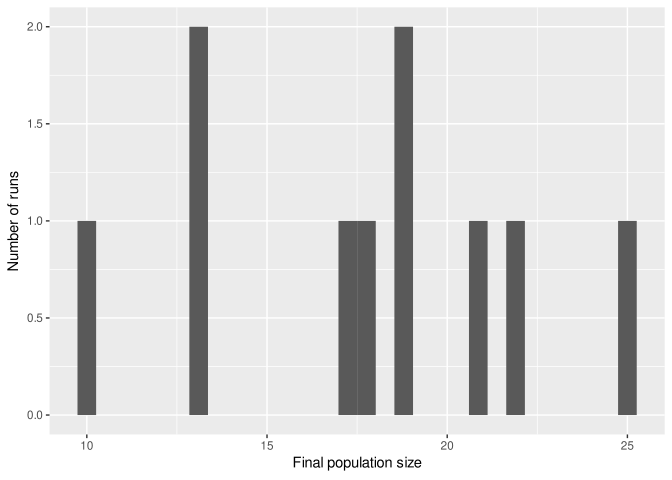
A first visualisation focuses on distributions of final outcomes, ignoring internal dynamics.

final_results <- results_multiple |>
  filter(`[step]` == max(`[step]`))

ggplot(final_results, aes(x = `total-households`)) +
  geom_histogram(bins = 30) +
  labs(
    x = "Final population size",
    y = "Number of runs"
  )

This plot answers questions such as:

  • Are most runs clustered around similar outcomes?
  • Are extreme collapses common or rare?
  • Does the distribution suggest multiple regimes or attractors?
NoteArtificial Anasazi interpretation

A long left tail or bimodal distribution often indicates coexistence of persistence and collapse trajectories.

33.6 Comparing parameter settings

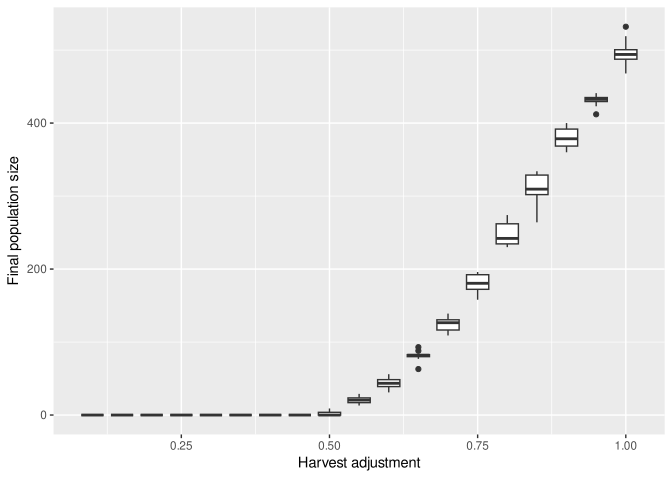
When parameters were varied systematically, we can compare outcomes across settings.

final_results <- results_harvest_adj |>
  filter(`[step]` == max(`[step]`))

ggplot(final_results,
       aes(x = `harvest-adjustment`, y = `total-households`, group = `harvest-adjustment`)) +
  geom_boxplot() +
  labs(
    x = "Harvest adjustment",
    y = "Final population size"
  )

Boxplots highlight:

  • median outcomes,
  • variability across repetitions,
  • possible threshold effects.
WarningInterpretation caution

Do not over-interpret smooth trends: BehaviorSpace grids can create visual regularities.

33.7 Repetitions and variability

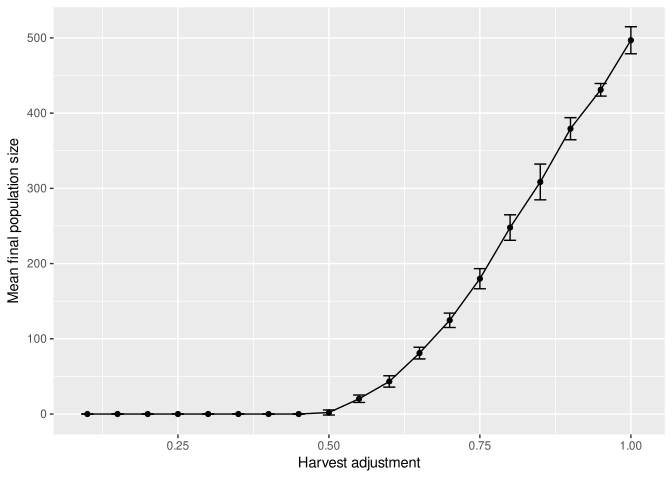
To visualise mean behaviour and uncertainty, we summarise repetitions.

summary_results <- final_results |>
  group_by(`harvest-adjustment`) |>
  summarise(
    mean_pop = mean(`total-households`),
    sd_pop   = sd(`total-households`),
    .groups = "drop"
  )

ggplot(summary_results,
       aes(x = `harvest-adjustment`, y = mean_pop)) +
  geom_line() +
  geom_point() +
  geom_errorbar(
    aes(ymin = mean_pop - sd_pop,
        ymax = mean_pop + sd_pop),
    width = 0.02
  ) +
  labs(
    x = "Harvest adjustment",
    y = "Mean final population size"
  )

This shifts attention from individual histories to typical outcomes and robustness.

33.8 Time series and trajectories

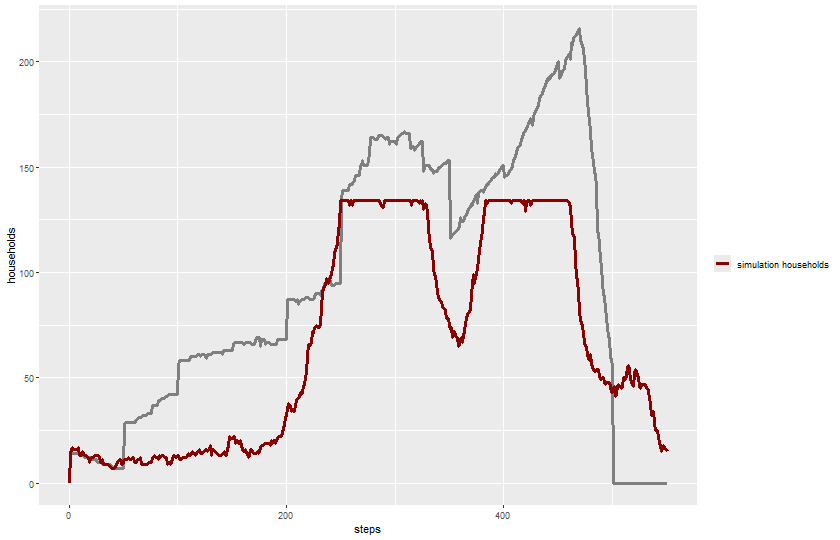
When metrics are recorded at every time step, trajectories become central.

To plot a single run:

plot_name <- paste0(experiments_path, expname_single, "-trajectories.png")

png(plot_name, width = 840, height = 540)

ggplot(results_single) +  
  geom_line(aes(x = `[step]`, y = `historical-total-households`, color = "historical data"),
            linewidth = 1.2) +
  geom_line(aes(x = `[step]`, y = `total-households`, color = "simulation households"),
            linewidth = 1.2) +
  labs(x = "steps", y = "households") +
  scale_color_manual(name = "", values = color_mapping) +
  theme(legend.position = "right")

dev.off()
svg 
  2 
knitr::include_graphics(plot_name)

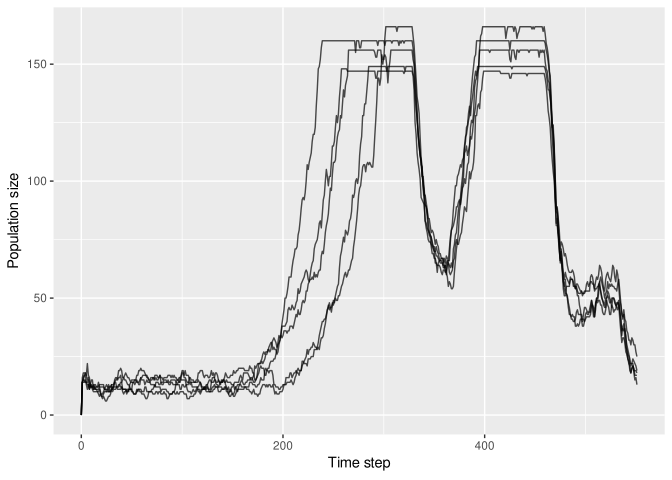
We may also sample a few runs from a multiple-run set and plot them together:

sample_runs <- results_multiple |>
  distinct(`[run number]`) |>
  slice_sample(n = 5)

results_multiple |>
  filter(`[run number]` %in% sample_runs$`[run number]`) |>
  ggplot(aes(x = `[step]`, y = `total-households`,
             group = `[run number]`)) +
  geom_line(alpha = 0.7) +
  labs(
    x = "Time step",
    y = "Population size"
  )

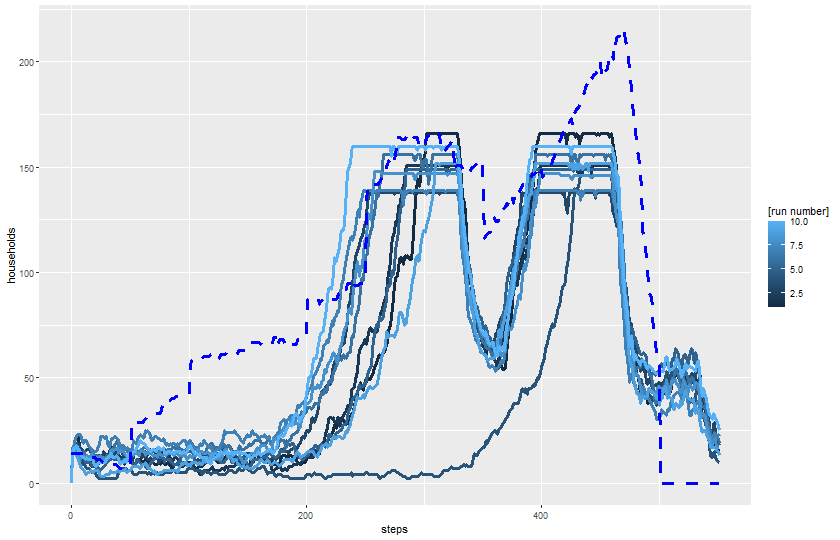
Alternatively, we may want to plot all repetitions under a parameter configuration. Here is an example using a slightly more complex plot that includes the historical trajectory and saves the plot to a file:

plot_name <- paste0(experiments_path, expname_multiple, "-trajectories.png")

png(plot_name, width = 840, height = 540)

ggplot(results_multiple) +  
  geom_line(aes(x = `[step]`, y = `total-households`, color = `[run number]`, group = `[run number]`),
            linewidth = 1.2) +
  geom_line(aes(x = `[step]`, y = `historical-total-households`), 
            color = color_mapping["historical households"],
            linewidth = 1.2, linetype = 2) +
  labs(x = "steps", y = "households") +
  theme(legend.position = "right")

dev.off()
svg 
  2 
knitr::include_graphics(plot_name)

Plotting a small sample of runs avoids overplotting while revealing:

  • divergence between histories,
  • timing of collapse,
  • early-warning patterns.

33.9 Linking parameters and outcomes

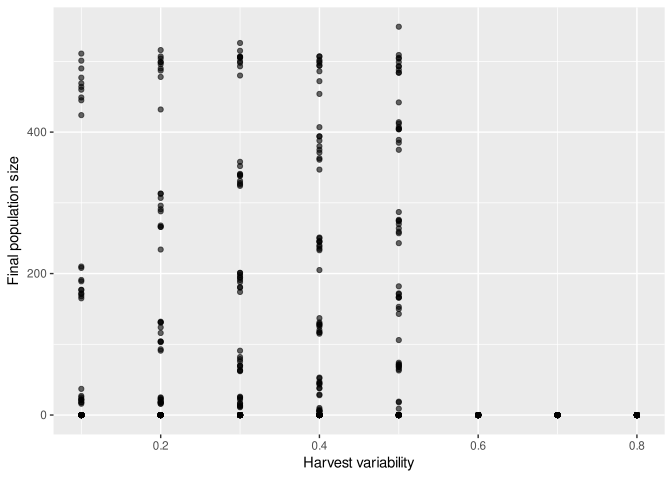
For randomly sampled parameter sets, scatter plots are particularly useful (see chapter on sensitivity analysis). However, it might still offer some insight when applied to regularly sampled parameters; unlike boxplots, scatter plots exposes the true variation of data points.

final_results <- results_harvest_adj_var |>
  filter(`[step]` == max(`[step]`))

ggplot(final_results,
       aes(x = `harvest-variance`, y = `total-households`)) +
  geom_point(alpha = 0.6) +
  labs(
    x = "Harvest variability",
    y = "Final population size"
  )

This allows us to ask:

  • Is there a clear relationship between parameter value (x-axis) and the output variable (y-axis)?
  • Are there large outcome ranges for similar inputs?
  • Do interactions between parameters seem likely?
NoteArtificial Anasazi interpretation

Wide vertical spread suggests strong stochastic effects or interactions with other parameters.

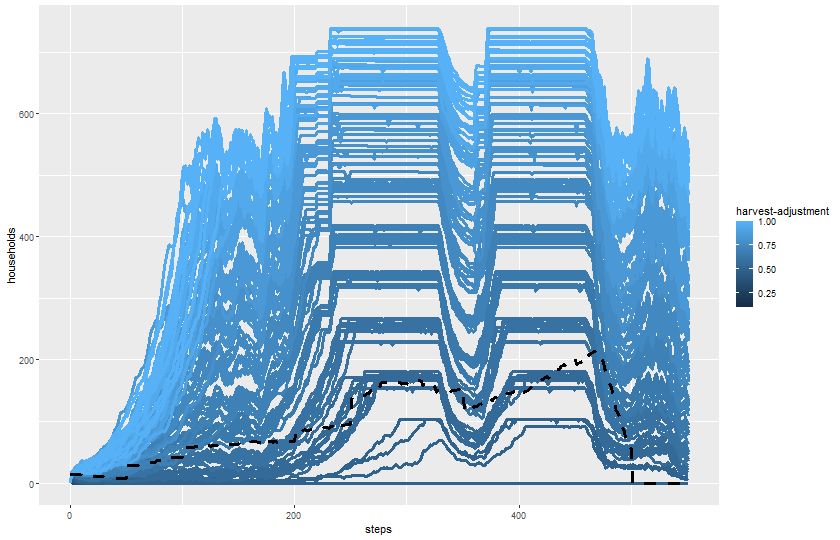
We may also want to detect effects that are only visible in the full trajectory of simulations. For this, we can use line plots as before, but there will be strong limits to how many runs can be included so that the plot is legible.

plot_name <- paste0(experiments_path, expname_harvest_adj, "-trajectories.png")

png(plot_name, width = 840, height = 540)

ggplot(results_harvest_adj) +  
  geom_line(aes(x = `[step]`, y = `total-households`, color = `harvest-adjustment`, group = `[run number]`),
            linewidth = 1.2) +
  geom_line(aes(x = `[step]`, y = `historical-total-households`), color = "black",
            linewidth = 1.2, linetype = 2) +
  labs(x = "steps", y = "households") +
  theme(legend.position = "right")

dev.off()
svg 
  2 
knitr::include_graphics(plot_name)

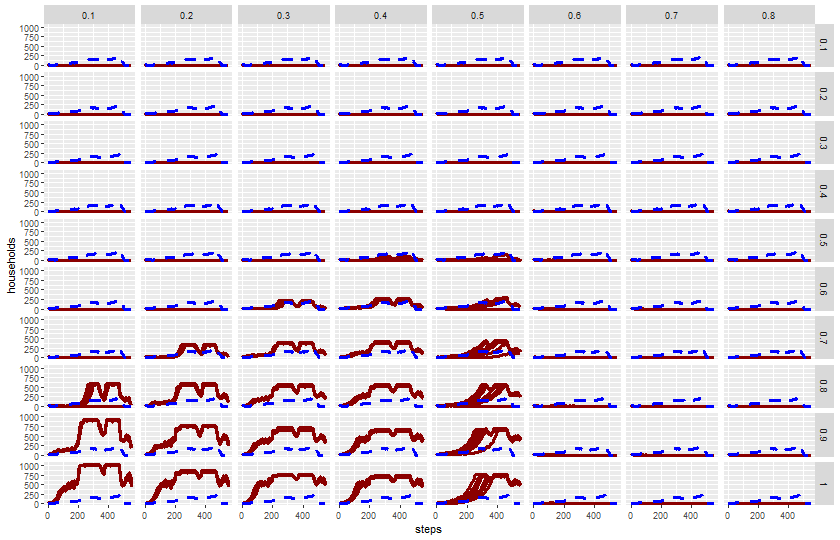
plot_name <- paste0(experiments_path, expname_harvest_adj_var, "-trajectories.png")

png(plot_name, width = 840, height = 540)

ggplot(results_harvest_adj_var) +  
  geom_line(aes(x = `[step]`, y = `total-households`, group = `[run number]`),
            color = color_mapping["simulation households"],
            linewidth = 1.2) +
  geom_line(aes(x = `[step]`, y = `historical-total-households`), 
            color = color_mapping["historical households"],
            linewidth = 1.2, linetype = 2) +
  facet_grid(`harvest-adjustment` ~ `harvest-variance`) +
  labs(x = "steps", y = "households", title = "harvest-adjustment (rows) vs harvest-variance (columns)") +
  theme(legend.position = "right")

dev.off()
svg 
  2 
knitr::include_graphics(plot_name)

33.10 Identifying extreme and representative runs

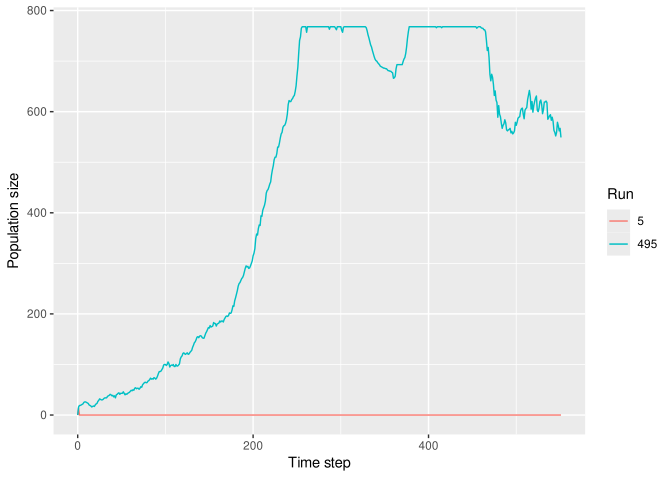
We can isolate extreme cases for closer inspection.

final_results <- results_harvest_adj_var |>
  filter(`[step]` == max(`[step]`))

extremes <- final_results |>
  arrange(`total-households`) |>
  slice(c(1, n()))

results_harvest_adj_var |>
  filter(`[run number]` %in% extremes$`[run number]`) |>
  ggplot(aes(x = `[step]`, y = `total-households`,
             group = `[run number]`,
             colour = factor(`[run number]`))) +
  geom_line() +
  labs(
    x = "Time step",
    y = "Population size",
    colour = "Run"
  )

This reconnects aggregate statistics with individual simulated histories.

33.11 Exercises (with code reuse)

TipExercise 1: Distribution

Modify the histogram code to plot:

  • time to collapse (if available),
  • or number of occupied settlements.

What changes in the shape of the distribution?

TipExercise 2: Parameter comparison

Perform an experiment varying another parameter and compare with the results exploring harvest-adjustment and harvest_variance.

Does this parameter show a stronger or weaker association with outcomes?

TipExercise 3: Trajectories

Increase the number of sampled runs to 10.

At what point does overplotting begin to obscure interpretation?