16 Getting started with NetLogo: Creating a “pond” terrain
Now, let us build a minimum working example of the elements explained above while moving toward the Pond Trade model prototype. Let us start with implementing a minimum base for the Pond Trade model: the pond-like terrain.
16.1 Step 0: Drawing a blue circle
Inside a single procedure, called create-map, we order (ask) all patches to do something using the structure:
to create-map

  ask patches
  [
    <DO_SOMETHING>
  ]

end
Next, we use the syntax for setting variables (set <VARIABLE> <VALUE>) inside the procedure to change patches colour to blue:
to create-map

  ask patches
  [
    set pcolor blue
  ]

end
Notice that both pcolor and blue are ‘primitives’, so they are automatically understood by NetLogo. Remember to consult NetLogo’s Dictionary if in doubt about such primitives. Colour primitives such as blue or their numeric equivalent are shown in ‘Color Swatches’ inside the Tools menu tab.
Since we don’t want all patches to have the same colour, we need to build some structure that gives different colours to patches depending on their position, so that a blue circle is drawn.
Considering how to draw a circle, we need two bits of information: a centre and a radius (respectively, O and R in the figure).

First, we must define a centre. Because we won’t use this information for anything else, we can declare and set a local variable (i.e., accessible only from its own context), using the syntax let <VARIABLE> <VALUE>. We define the centre patch coordinates as (0,0):
to create-map

  ask patches
  [
    let centralPatch patch 0 0

    set pcolor blue
  ]

end
We can set a radius for our circle using a single numeric value, e.g. 5, expressed in patch widths:
to create-map

  ask patches
  [
    let centralPatch patch 0 0

    let minDistOfLandToCenter 5

    set pcolor blue
  ]

end
However, if we pass a single absolute numeric value to compare against a distance, the result will depend on how large our world grid is. This is not wise, since we might want to use this procedure on grids of different dimensions. Imagine you want to change the grid dimensions but keep the circle covering a similar proportion of it (e.g., adjusting the resolution of our map).
We can easily avoid this fragility by increasing the code’s complexity. One alternative is to work with a proportion of one grid dimension, e.g. width (world-width). For now, we will set it to half of half (a quarter) of the width, since the circle is positioned in the middle of the grid.
to create-map

  ask patches
  [
    let centralPatch patch 0 0

    let minDistOfLandToCenter round (0.5 * (world-width / 2))

    set pcolor blue
  ]

end
Running this code will still not produce a blue circle. Instead, we ask all patches to paint themselves blue, no matter the values of centralPatch or minDistOfLandToCenter.
To differentiate patches to be painted blue, we now use minDistOfLandToCenter for evaluating a criterion for a ifelse structure, finding out if a patch is inside or outside our circle. With this, we are ordering patches to paint themselves green or blue depending on whether their distance to the centre is less than a given value, i.e. minDistOfLandToCenter.
ifelse (distance centralPatch < minDistOfLandToCenter)
[
  set pcolor blue ; water
]
[
  set pcolor green ; land
]
Now, the entire code for the create-map procedure is finally doing what we expected, drawing a blue circle over a green background:
to create-map

  ask patches [

    ; set central patch
    let centralPatch patch 0 0

    ; set minimum distance to center depending on world width
    let minDistOfLandToCenter round (0.5 * (world-width / 2))

    ifelse (distance centralPatch < minDistOfLandToCenter)
    [
      set pcolor blue ; water
    ]
    [
      set pcolor green ; land
    ]

  ]

end
Create a button in the interface for executing the create-map procedure and see the result.

Pond Trade step 0
16.2 Step 1a: De-composing “magic numbers”
The code we just created has several fixed arbitrary values (the coordinates of the centralPatch, the values used to calculate minDistOfLandToCenter). It is good enough for us to draw a particular blue circle, but it is insufficient to draw other types of blue circles. Of course, the code will never be able to draw anything, if we are not programming it to do it. For instance, the colours blue and green are also magic numbers, but we are hardly interested in having them as parameters. We must generalise but also compromise, accepting that our model won’t cover every possibility.
First, is there any case where the patch 0 0 is not the one at the centre of the grid? Imagine you don’t want negative coordinates in your model. Go to “Settings” and modify the “location of origin” to be at the corner. Now, test the create-map procedure:

This is not what we are looking for! To fix this behaviour, we must calculate the centre coordinates based on the grid’s width and height, regardless of its configuration. Therefore, we must replace 0 with the calculation minimum + range / 2 for both x and y coordinates:
let centralPatch patch (min-pxcor + floor (world-width / 2)) (min-pycor + floor (world-height / 2))We use the floor function to get the rounded-down grid position when the range is odd. Because this calculation uses only NetLogo primitives, you can test this by printing it in the console in any NetLogo model. It will return the central patch given your grid settings:
observer> show patch (min-pxcor + floor (world-width / 2)) (min-pycor + floor (world-height / 2))
observer: (patch 16 16)
Now, regarding minDistOfLandToCenter, we could simply make it a parameter set in the interface instead of hard-coding it (e.g. as a slider). This would be a better design, but we would still have a potential problem. Maybe you do not want the grid to be square (e.g., 33x33), but rectangular (e.g., 100x20) instead. This is what you would get:

Again, not what we are looking for. No matter how strangely shaped our map is, we want our pond to always be fully within the grid. To do this, we must modify our minDistOfLandToCenter calculation to account for both width and height. One way is to calculate the radius for both dimensions and choose the smaller value.
let minXDistOfLandToCenter round (0.5 * world-width / 2) ; minimum distance in X

let minYDistOfLandToCenter round (0.5 * world-height / 2) ; minimum distance in Y

let minDistOfLandToCenter min (list minXDistOfLandToCenter minYDistOfLandToCenter)
To test our solution, we can run the procedure with different extreme grid settings:
| 100x20 | 20x100 |
|---|---|
 |
 |
Success!
16.3 Step 1b: Parameterising
Once you defined a procedure in raw terms and tested that it does what you expect, you probably want to generalise it further. As the aim of modelling is to represent a type of phenomenon, it is a good practice to program all non-dynamic conditions as parameters. In NetLogo, parameters are often variables that users can set through the interface tab (e.g., sliders, selectors, numeric fields).
After the later changes, we still have two magic numbers in our code. Regarding the calculation of centralPatch and minDistOfLandToCenter, we used 2 to divide world-width and world-height, so that the circle is always drawn in the centre of the grid. Although it is possible, we will not replace this value with a parameter. As an exercise aside, you can test the outcome of having different numbers instead of 2.
The other “magic number” is 0.5, used to represent the relative size of the pond radius, i.e., the half of the half of the smaller dimension. This is a good candidate for a parameter. It is reasonable to expect that pond size will affect our model’s results. Mainly, we expect larger ponds to slow trade, assuming a fixed number of settlements evenly distributed around the pond.
In NetLogo, we create a parameter by adding an input element to the interface tab (e.g., a slider) and naming it. In this case, we create a parameter called pondSize that represents the pond radius as a percentage of the smallest dimension, i.e. varying between 0 and 100. We can use it in the code to replace the two instances of 0.5 with (pondSize / 100):
let minXDistOfLandToCenter round ((pondSize / 100) * (world-width / 2)) ; minimum distance in X

let minYDistOfLandToCenter round ((pondSize / 100) * (world-height / 2)) ; minimum distance in Y

let minDistOfLandToCenter min (list minXDistOfLandToCenter minYDistOfLandToCenter)
Note that we use percentages instead of proportions (0 to 1) because it improves the intelligibility of our model. I recommend using percentages for these parameters because they are more intuitive for humans and easier for colleagues and the general public to understand, even without a background in computer science or mathematics.
Once you close a version of any piece of code, it is good practice to increase the spacing between the lines or even break down single lines that are particularly complicated. NetLogo allows a lot of flexibility here: you can add spaces, tabs, line breaks, and commentary between most elements of your code. Also, enclosing parentheses are not required but may improve readability.
to create-map

  ask patches [

    ; find central patch, depending on the size of dimensions

    let centralPatch
      patch
      ; position in X
      (
        min-pxcor +
        floor (world-width / 2)
      )
      ; position in Y
      (
        min-pycor +
        floor (world-height / 2)
      )

    ; find minimum distance of land patches to the central patch, depending on the size of dimensions

    let minXDistOfLandToCenter round ((pondSize / 100) * (world-width / 2)) ; minimum distance in X

    let minYDistOfLandToCenter round ((pondSize / 100) * (world-height / 2)) ; minimum distance in Y

    let minDistOfLandToCenter min (list minXDistOfLandToCenter minYDistOfLandToCenter)

    ifelse (distance centralPatch < minDistOfLandToCenter)
    [
      set pcolor blue ; water
    ]
    [
      set pcolor green ; land
    ]

  ]

end
16.4 Step 1c: Optimasing
We increased the ’ create-map ’ procedure significantly, but we now have a process that is both flexible and controllable by user input. Yet, we still have a pending issue to solve.
The fact that centralPatch and minDistOfLandToCenter are local variables (let) and are placed inside ask patches [ <ACTIONS> ] means that we are creating and destroying a different variable once for every patch. We cannot use these variables (plural intended) outside their enclosing brackets, and patches hold no memory of their values before or after this particular action. Does anything feel wrong about this?
Besides wasting computational resources, this design doesn’t generate errors and, for now, is quite inoffensive. However, while it can be easily solved in a short piece of code, it might become harder to find and have odd repercussions on other parts of our model later on.
The solution is to extract the declarations of the local variables centralPatch and minDistOfLandToCenter from the patches commands. They are now calculated only once at the start of the procedure and then used by every patch:
to create-map

  ; find central patch, depending on the size of dimensions
  let centralPatch
    patch
    ; position in X
    (
      min-pxcor +
      floor (world-width / 2)
    )
    ; position in Y
    (
      min-pycor +
      floor (world-height / 2)
    )
  print(centralPatch) ; print central patch

  ; find minimum distance of land patches to the central patch, depending on the size of dimensions
  let minXDistOfLandToCenter round ((pondSize / 100) * (world-width / 2)) ; minimum distance in X
  let minYDistOfLandToCenter round ((pondSize / 100) * (world-height / 2)) ; minimum distance in Y
  let minDistOfLandToCenter min (list minXDistOfLandToCenter minYDistOfLandToCenter)

  ask patches [

    ifelse (distance centralPatch < minDistOfLandToCenter)
    [
      set pcolor blue ; water
    ]
    [
      set pcolor green ; land
    ]

  ]

end
16.5 Checking the milestone File (step 1)
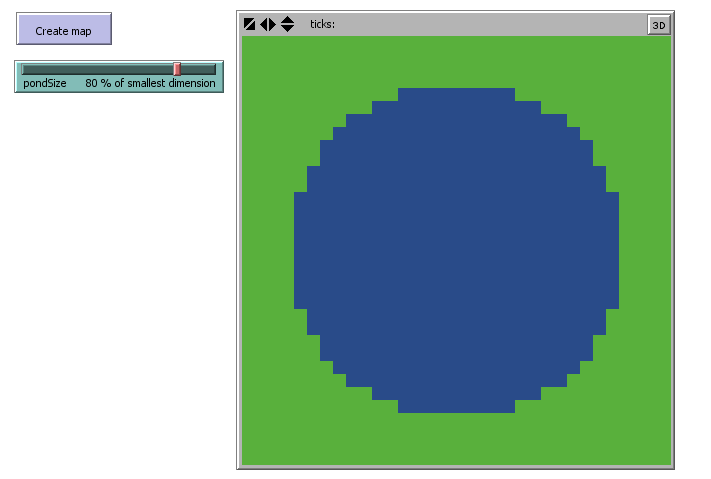
Pond Trade step 1
16.6 Step 2a: Pacing comments and line breaks
Since our code is simple for now, we can reduce the extensive comments and line breaks in the calculation of centralPatch.
Commenting and spacing your code is generally good practice, but don’t get carried away! You must assume your reader knows something about the programming language and the model’s context. Sometimes comments and line breaks are too much and end up defeating the purpose of improving code readability.
to create-map

  let centralPatch patch (min-pxcor + floor (world-width / 2)) (min-pycor + floor (world-height / 2))

  ; find minimum distance to center
  let minXDistOfLandToCenter round ((pondSize / 100) * (world-width / 2)) ; minimum distance in X
  let minYDistOfLandToCenter round ((pondSize / 100) * (world-height / 2)) ; minimum distance in Y
  let minDistOfLandToCenter min (list minXDistOfLandToCenter minYDistOfLandToCenter)

  ask patches [

    ifelse (distance centralPatch < minDistOfLandToCenter)
    [
      set pcolor blue ; water
    ]
    [
      set pcolor green ; land
    ]

  ]

end
At every step in this tutorial, we will be downgrading most comments added in the previous step.
16.7 Step 2b: Exploring alternative designs
During refactoring, we should keep in mind that alternative designs can produce the outcome we seek, and some may be more readable or optimal.
In this case, we can simplify the calculation of minDistOfLandToCenter. This new version initialises a local variable halfSmallerDimension assuming the smaller dimension is the width. Then it checks that this is the case and updates it if the height is actually smaller. Finally, we calculate minDistOfLandToCenter as a proportion of halfSmallerDimension. Test alternative code fragments by “commenting-out/in” them in the code editor.
;let minXDistOfLandToCenter round ((pondSize / 100) * (world-width / 2)) ; minimum distance in X
;let minYDistOfLandToCenter round ((pondSize / 100) * (world-height / 2)) ; minimum distance in Y
;let minDistOfLandToCenter min (list minXDistOfLandToCenter minYDistOfLandToCenter)

let halfSmallerDimension (world-width / 2)
if (world-width > world-height) [ set halfSmallerDimension (world-height / 2) ]

let minDistOfLandToCenter round ((pondSize / 100) * halfSmallerDimension)
This version is less redundant, uses two instead of three local variables, and more clearly expresses that the condition compares grid width and height.
16.8 Step 2c: Colors and shades
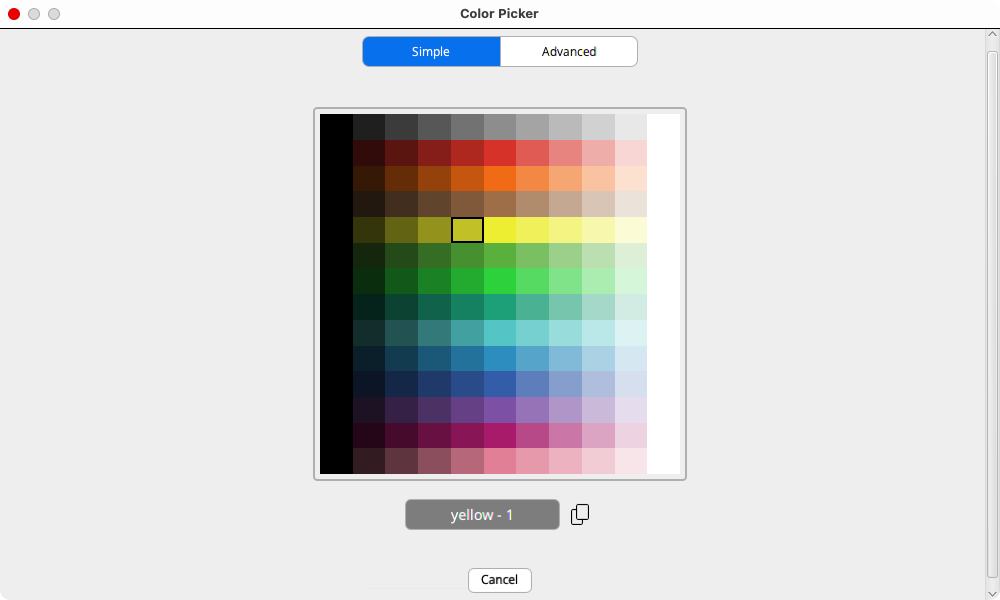
Last, we replace the text reference for colours with NetLogo’s numerical codes. Using this numeric system allows us to use many shades of any given colour. In this case, we are selecting slightly different shades of blue (106) and green (54). You can consult the colour codes in “Tools” > “Color Picker” or in https://docs.netlogo.org/colorpicker.html:
16.9 Checking the milestone File (step 2)
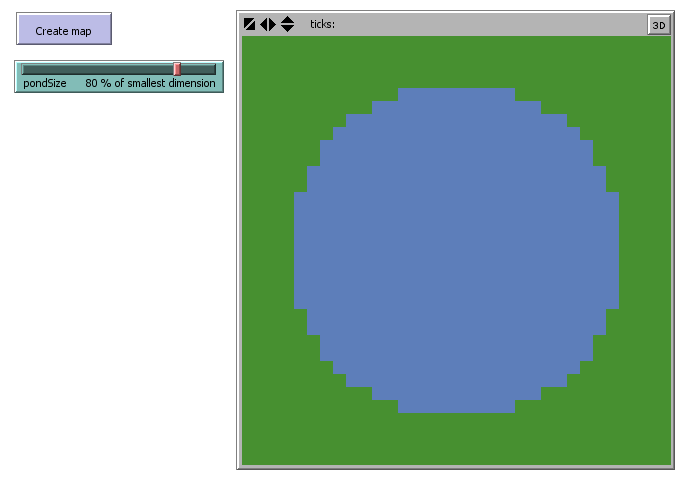
Pond Trade step 2
Great, now we can draw a blue circle with a bulletproof piece of NetLogo code. Now let us go a few steps faster and aim at a more interesting outcome.
16.10 Step 3: Adding noise (stochasticity)
Stochasticity is intrinsic in NetLogo. We were already dealing with random processes since step 0, when asking patches to paint themselves. You probably did not realise, but the command ask patches demands that patches are ordered somehow. Think of it as being told to hand out cards to the players of a card game. Who exactly will receive the first card? Who the second? NetLogo solves this dilemma automatically by randomising the order of “asking”. As an exercise, you can reduce the simulation velocity (top of the interface tab) and run the create-map procedure.
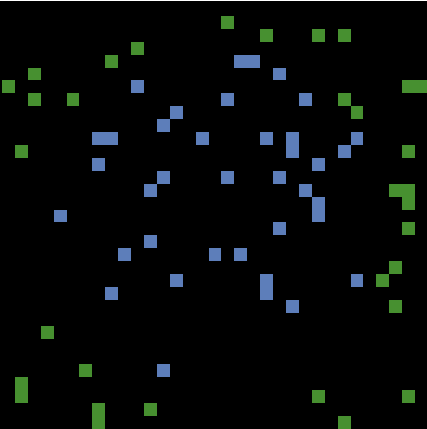
You will observe each patch changing colour, one at a time. This is also a nice example of using stochasticity to ensure that an aggregated outcome (i.e. blue circle) is not a mere artefact of any particular schedule of processes (i.e. the order in which patches change colours). Remember, sequences will differ every time we run our simulation unless we pre-set the RNG using a specific ‘seed’ (see https://docs.netlogo.org/dict/random-seed.html).
But is a random order so important? In our script so far, it is completely irrelevant. Our goal was to draw a blue circle; it does not matter which patch assumes the role of land or water first. However, this will become increasingly relevant as we advance in creating a proper agent-based model, because agents’ states DO normally depend on other agents’ states.
Imagine the scenario where you want to share some news with your friends, and that each time you explain it to one of them, she/he has the opportunity to spread it among your other friends. Considering that some of your friends are more chatty than others, can you assume that the order in which you tell your news to each friend would not affect how fast your news would spread? ‘I don’t think so’, ‘Who knows?!’, ‘I don’t really care about it’? If these thoughts cross your mind while addressing a process in your model, you are probably better off using stochasticity.
An easy example of when stochasticity is not desirable is a line in a coffee house, where each person should move forward after the person in front. If the order in which people in line move is not fixed, the line would move much more slowly (i.e., the person who should move would have to wait until their turn, while others who cannot move would be constantly skipping their turn) or even break the line completely (i.e. once one person moves twice consecutively, a gap in the line will open).
Stochasticity in scheduling order
When it is desirable:
- process might be sensitive to scheduling order, but its effect is uninteresting, trivial, or unknown
- there is uncertainty about the order in which agents should act
Example: A group of agents moving randomly in space. The order in which agents are asked to move is unimportant, as long as it differs each time.
When it is undesirable:
- the order in which agents are asked to act is important for the model outcome
- the process should follow a fixed, known order
Example: A group of agents racing towards a target in space. The order in which agents are asked to move might affect who wins.
A perfect blue circle is great, but it poorly represents a real water body. Once we implement the model dynamics, it will be difficult to explore the effect of geography solely by varying the pond size. The first step to creating more interesting set-ups is to add noise to the condition that determines whether a patch is land or water. NetLogo has a family of primitive functions, random and similar, that generate random discrete (integer) and continuous (float) values, following different probability distributions (e.g., uniform, normal, exponential).
For each patch, we sample a random continuous number, add it to the minDistOfLandToCenter, and use it as the threshold distance from the centre:
let coastThreshold minDistOfLandToCenter + random-float (halfSmallerDimension * coastalNoiseLevel / 100)

ifelse (distance centralPatch < coastThreshold)
[
  set pcolor 106 ; blue for water
]
[
  set pcolor 54 ; green for land
]
The function random-float <number> returns a random “float” number greater than or equal to 0.0 and less than <number>. To push your learning a bit, we’re taking a few minor refactoring steps by defining noise as a portion of halfSmallerDimension and controlling it through the coastalNoiseLevel parameter, exposed in the interface.
to create-map

 let centralPatch patch (min-pxcor + floor (world-width / 2)) (min-pycor + floor (world-height / 2))

 let halfSmallerDimension (world-width / 2)
 if (world-width > world-height) [ set halfSmallerDimension (world-height / 2) ]

 let minDistOfLandToCenter round ((pondSize / 100) * halfSmallerDimension)

 ask patches
 [

   ; add noise to coastline
   let coastThreshold minDistOfLandToCenter + random-float (halfSmallerDimension * coastalNoiseLevel / 100)

   ifelse (distance centralPatch < coastThreshold)
   [
     set pcolor 106 ; blue for water
   ]
   [
     set pcolor 54 ; green for land
   ]

 ]

end
We can now generate strange “spray ponds”. More importantly, we made the generation process controllable through two easily understandable parameters. Play with the parameters and reflect on how they affect the pond’s shape.
16.11 Checking the milestone File (step 3)
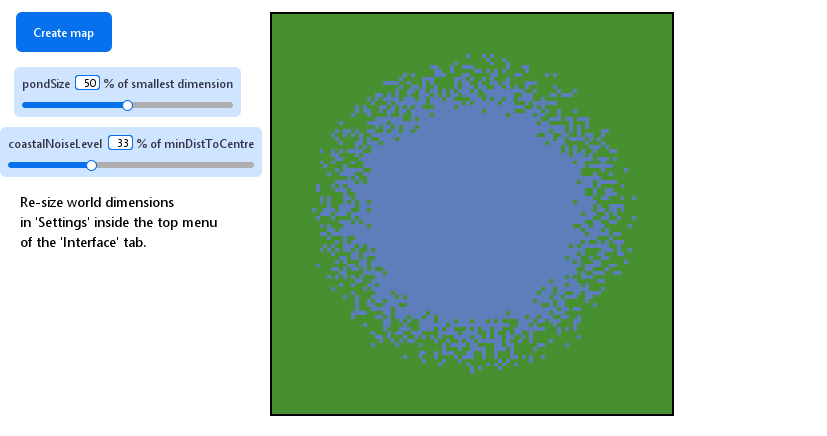
Pond Trade step 3
16.12 Step 4b: design alternatives
Because a “spray pond” is not exactly what we want, let us implement another alternative to add stochasticity. NetLogo offers the random-normal primitive, which samples a random “float-point number” given the mean and standard deviation of a normal distribution, using the structure random-normal <MEAN> <STD.DEV> (https://ccl.northwestern.edu/netlogo/docs/dictionary.html#random-reporters). In this context, we can reuse the coastalNoiseLevel parameter for the latter and use minDistOfLandToCenter as the mean.
Comment out the line with random-float and add the following:
; let coastThreshold minDistOfLandToCenter + random-float (halfSmallerDimension * coastalNoiseLevel / 100)
let coastThreshold random-normal minDistOfLandToCenter (halfSmallerDimension * coastalNoiseLevel / 100)
We can now experiment running create-map in three different ways: without noise, with uniform-distributed noise, and with normal-distributed noise. Run each by commenting out the line for the other two. For example, to come back to the no-noise option:
; no noise
let coastThreshold minDistOfLandToCenter
; uniform-distributed noise
; let coastThreshold minDistOfLandToCenter + random-float (halfSmallerDimension * coastalNoiseLevel / 100)
; normal-distributed noise
let coastThreshold random-normal minDistOfLandToCenter (halfSmallerDimension * coastalNoiseLevel / 100)| no noise |  |
| uniform |  |
| normal | 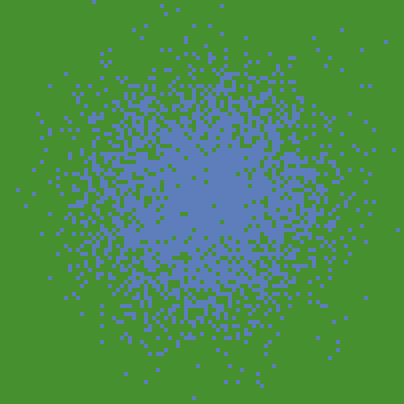 |
But at this point, can we decide which option we want going forward?
16.13 Step 4c: keeping design alternatives
As mentioned, stochasticity may be the only honest way to define values that are unknown or undefined in our conceptual model but still need specification in the model implementation. Another useful, still honest approach is to consolidate alternative solutions and expose the criterion for deciding among them as a special type of parameter. Often, these will be Booleans (true or false), which can be set with “switchers” in the NetLogo interface, or strings (declarative text, e.g. "option A", "option B", "option C"), which can be selected through “choosers” or dropdown menus.
Create a chooser by clicking “Add” and then “chooser” in the NetLogo Interface tab. Give it the name noiseType and write down a name for each alternative as String values:
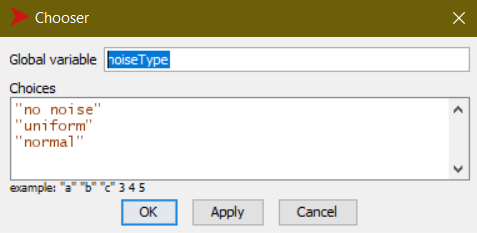
The configuration of a “chooser” for noiseType
Then, we use this new parameter in if structures containing the code specific to each alternative:
; no noise stands as the default alternative
let noiseRange (halfSmallerDimension * coastalNoiseLevel / 100)

ask patches
[
  if (noiseType = "uniform")
  [
    ; adds a random amount from a uniform distribution with mean minDistOfLandToCenter
    set noiseRange (random-float noiseRange) - (noiseRange / 2)
    set coastThreshold minDistOfLandToCenter + noiseRange
  ]
  if (noiseType = "normal")
  [
    ; adds a random amount from a normal distribution with mean minDistOfLandToCenter
    set coastThreshold random-normal minDistOfLandToCenter noiseRange
  ]

  ; ... existing code ...
]
With this, we can run create-map with any of the alternative designs without commenting code in and out every time.
16.14 Step 4d: patch neighborhood
Despite having all the alternative modes of stochasticity, our ponds are still not quite what we need. This kind of terrain might represent something like a swamp, but not a distinct water body. The coastline, which makes PondTrade more interesting, is missing.
One generic, but very useful technique in distributed computation is “smoothing”. More precisely, smoothing refers to approximating each point in a variable with the average of a sample of points, often taken from within the point’s neighbourhood.
In a two-dimensional grid such as in NetLogo, we can use the values in each patch’s immediate neighbourhood to adjust its value. In our case, we want to switch a patch’s colour depending on the colour of adjacent patches. We can anticipate, however, that we will need to expose another parameter: one that expresses how many neighbours (out of eight) of a type are enough to activate the change. We will call it coastLineSmoothThreshold. Notice that this step moves data in the opposite direction of our last steps, reducing stochasticity. Yet, it does not bring us back to the original circle. Therefore, we want to smooth after adding noise.
Remembering our mandate of modularity, we want to avoid adding this code directly in create-map. Rather, we can implement it in a cleaner way by enclosing it in a new procedure:
to smooth-coast-line

  ask patches
  [
    ifelse (pcolor = 106)
    [
      ; water patch
      if (count neighbors with [pcolor = 54] >= coastLineSmoothThreshold)
      [
        ; water patch has a certain number of land neighbours
        set pcolor 54 ; converted to land
      ]
    ]
    [
      ; land patch
      if (count neighbors with [pcolor = 106] >= coastLineSmoothThreshold)
      [
        ; land patch has a certain number of water neighbours
        set pcolor 106 ; converted to water
      ]
    ]
  ]

end
We can then use it by calling smooth-coast-line after create-map, either through the console or, better, by adding a button in the interface. Testing it for each noiseType:
| no noise | |
| uniform |  |
| normal | 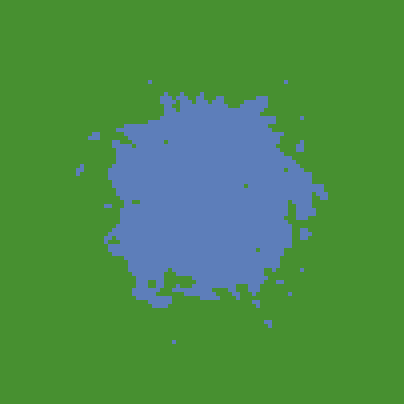 |
Notice that the no-noise option has no visible effect, but we significantly change the outcome of the others.
16.15 Step 4e: iterative structures
Try pressing the new smooth-coast-line button more than once after create-map. The coastline will become smoother and smoother until it stabilises. This behaviour indicates a good opportunity to implement an iterative structure. NetLogo has an easy option for this using the following structure: repeat <NUMBER OF ITERATIONS> [ <COMMANDS> ], requiring that we expose another parameter specifying the number of iterations, which we will call smoothIterations.
to smooth-coast-line

  ; smooth coast line
  repeat smoothIterations
  [
    ask patches
    [
      ifelse (pcolor = 106)
      [
        ; water patch
        if (count neighbors with [pcolor = 54] >= coastLineSmoothThreshold)
        [
          ; water patch has a certain number of land neighbours
          set pcolor 54 ; converted to land
        ]
      ]
      [
        ; land patch
        if (count neighbors with [pcolor = 106] >= coastLineSmoothThreshold)
        [
          ; land patch has a certain number of water neighbours
          set pcolor 106 ; converted to water
        ]
      ]
    ]
  ]

end
16.16 Step 4f: using the clear-all command
At this point, we should make sure everything in our code is applied in a completely new “world” every time to avoid unintended interference between consecutive executions. To do this, we should add the command clear-all before doing any operation involving patch attributes:
to create-map

  ; erase previous data
  clear-all

  ; ... existing code ...

end
Normally, we should have done this by default at the very beginning of coding, since you would most likely need it for any simulation model.
16.17 Step 4g: printing event messages
Since we are expanding the complexity of our code considerably, this is a good time to print messages so we know what is happening in the background after pressing the buttons in the interface. This will be valuable, especially when the code encounters an error or produces an unexpected result (i.e., debugging).
to create-map

  print "Creating map..."

  ; erase previous data
  clear-all

  let centralPatch patch (min-pxcor + (floor world-width / 2)) (min-pycor + (floor world-height / 2))

  let halfSmallerDimension (world-width / 2)
  if (world-width > world-height) [ set halfSmallerDimension (world-height / 2) ]

  let minDistOfLandToCenter round ((pondSize / 100) * halfSmallerDimension)

  let coastThreshold minDistOfLandToCenter ; defaults to the basic value

  ;; add noise to coastline
  ; set general noise range depending on UI's coastalNoiseLevel and the size of world
  let noiseRange (halfSmallerDimension * coastalNoiseLevel / 100)

  print "Assigning initial patch types..."

  ask patches
  [
    ; noiseType is specified with the chooser in the UI
    if (noiseType = "uniform")
    [
      ; adds a random amount from a uniform distribution with mean minDistOfLandToCenter
      set noiseRange (random-float noiseRange) - (noiseRange / 2)
      set coastThreshold minDistOfLandToCenter + noiseRange
    ]
    if (noiseType = "normal")
    [
      ; adds a random amount from a normal distribution with mean minDistOfLandToCenter
      set coastThreshold random-normal minDistOfLandToCenter noiseRange
    ]

    ifelse (distance centralPatch < coastThreshold)
    [
      set pcolor 106 ; blue for water
    ]
    [
      set pcolor 54 ; green for land
    ]

  ]

  print "done."

end

to smooth-coast-line

  print "Smoothing..."

  ; smooth coastline
  repeat smoothIterations
  [
    ask patches
    [
      ifelse (pcolor = 106)
      [
        ; water patch
        if (count neighbors with [pcolor = 54] >= coastLineSmoothThreshold)
        [
          ; water patch has a certain number of land neighbours
          set pcolor 54 ; converted to land
        ]
      ]
      [
        ; land patch
        if (count neighbors with [pcolor = 106] >= coastLineSmoothThreshold)
        [
          ; land patch has a certain number of water neighbours
          set pcolor 106 ; converted to water
        ]
      ]
    ]
  ]
  print "done."

end
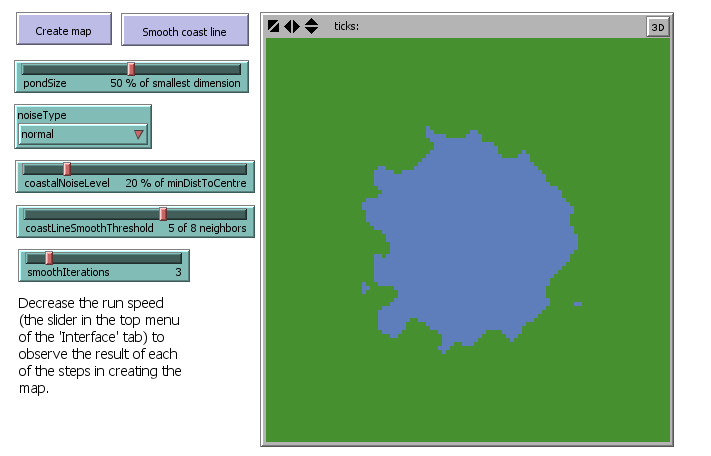
We consolidated a version of our script that creates interesting (and more realistic) water body shapes with stochasticity, varying the output with five clearly displayed parameters and no hidden magic number of consequence.
16.18 Checking the milestone File (step 4)
Pond Trade step 4
16.19 Step 5: refactoring (again)
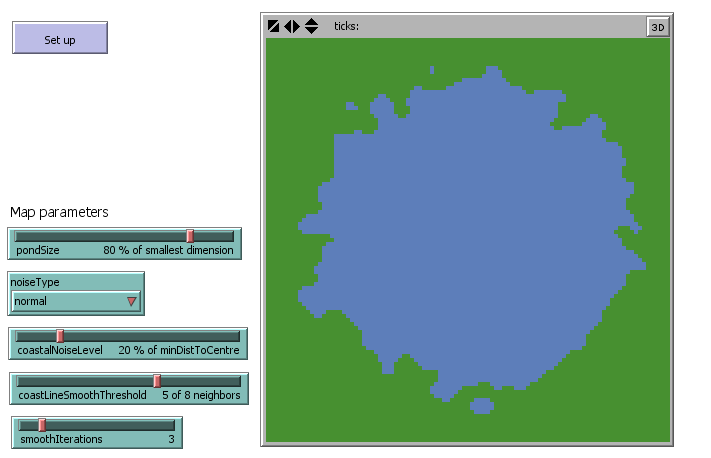
We reached our initial objective: a realistic, procedurally generated terrain on which we can build Pond Trade. As before, we should now stop ourselves and think about refactoring again.
Here is a summary of the improvements we can make:
- Control the RNG seed and expose it in the interface
- Move the initialisation of
coastThresholdandnoiseRangebeforeask patches - Declare a new patch Boolean variable called
isLandand use it to replace colour in the procedures for creating terrains - Define a new procedure
paint-patchesdedicated only to setting patch colours based onisLand - Call
smooth-coast-lineandpaint-patchesat the end ofcreate-map - In the evaluation of
coastLineSmoothThresholdused insmooth-coast-line, consider it in relation to the actual number of neighbours instead of as an absolute number (to avoid having isolated water bodies adjacent to the world edges, where there are fewer than 8 neighbours) - Rearrange the interface elements to set apart the parameters we will be using for terrain generation
patches-own [ isLand ]

to setup

  clear-all

  ; set the random seed so we can reproduce the same experiment
  random-seed seed

  create-map

end

to create-map

  let centralPatch patch (min-pxcor + (floor world-width / 2)) (min-pycor + (floor world-height / 2))

  let halfSmallerDimension (world-width / 2)
  if (world-width > world-height) [ set halfSmallerDimension (world-height / 2) ]

  let minDistOfLandToCenter round ((pondSize / 100) * halfSmallerDimension)

  let coastThreshold minDistOfLandToCenter ; defaults to the basic value

  ;; add noise to coastline
  ; set general noise range depending on UI's coastalNoiseLevel and the size of world
  let noiseRange (halfSmallerDimension * coastalNoiseLevel / 100)

  ask patches
  [
    ; noiseType is specified with the chooser in the UI
    if (noiseType = "uniform")
    [
      ; adds a random amount from a uniform distribution with mean minDistOfLandToCenter
      set noiseRange (random-float noiseRange) - (noiseRange / 2)
      set coastThreshold minDistOfLandToCenter + noiseRange
    ]
    if (noiseType = "normal")
    [
      ; adds a random amount from a normal distribution with mean minDistOfLandToCenter
      set coastThreshold random-normal minDistOfLandToCenter (halfSmallerDimension * coastalNoiseLevel / 100)
    ]

    ifelse (distance centralPatch < coastThreshold)
    [
      set isLand false
    ]
    [
      set isLand true
    ]

  ]

  smooth-coast-line

  paint-patches

end

to smooth-coast-line

  ; smooth coast line
  repeat smoothIterations
  [
    ask patches
    [
      ifelse (isLand = false)
      [
        ; water patch
        ; consider ratios instead of absolute numbers to avoid having isolated water bodies adjacent to the world limits (less than 8 neighbours)
        if (count neighbors with [isLand = true] / count neighbors >= coastLineSmoothThreshold / 8)
        [
          ; water patch has a certain number of land neighbours
          set isLand true ; converted to land
        ]
      ]
      [
        ; land patch
        if (count neighbors with [isLand = false] / count neighbors >= coastLineSmoothThreshold / 8)
        [
          ; land patch has a certain number of water neighbours
          set isLand false ; converted to water
        ]
      ]
    ]
  ]

end

to paint-patches

  ask patches
  [
    ifelse (isLand = false)
    [ set pcolor 106 ] ; blue for water
    [ set pcolor 54 ] ; green for land
  ]

end
16.20 Checking the milestone File (step 5)
Pond Trade step 5